Reusability
Write infrastructure logic once and reuse it across dev, test, staging, production, multiple applications, or multiple cloud accounts.
Terraform modules help teams package infrastructure into reusable building blocks. Instead of copying the same VPC, subnet, security group, database, storage, or Kubernetes code across every project, engineers can create clean modules and reuse them safely across environments.
This guide explains Terraform modules from beginner to real-world DevOps level: root modules, child modules, inputs, outputs, folder structure, reusable AWS examples, enterprise module patterns, CI/CD automation, registry usage, versioning, common mistakes, and practical best practices.
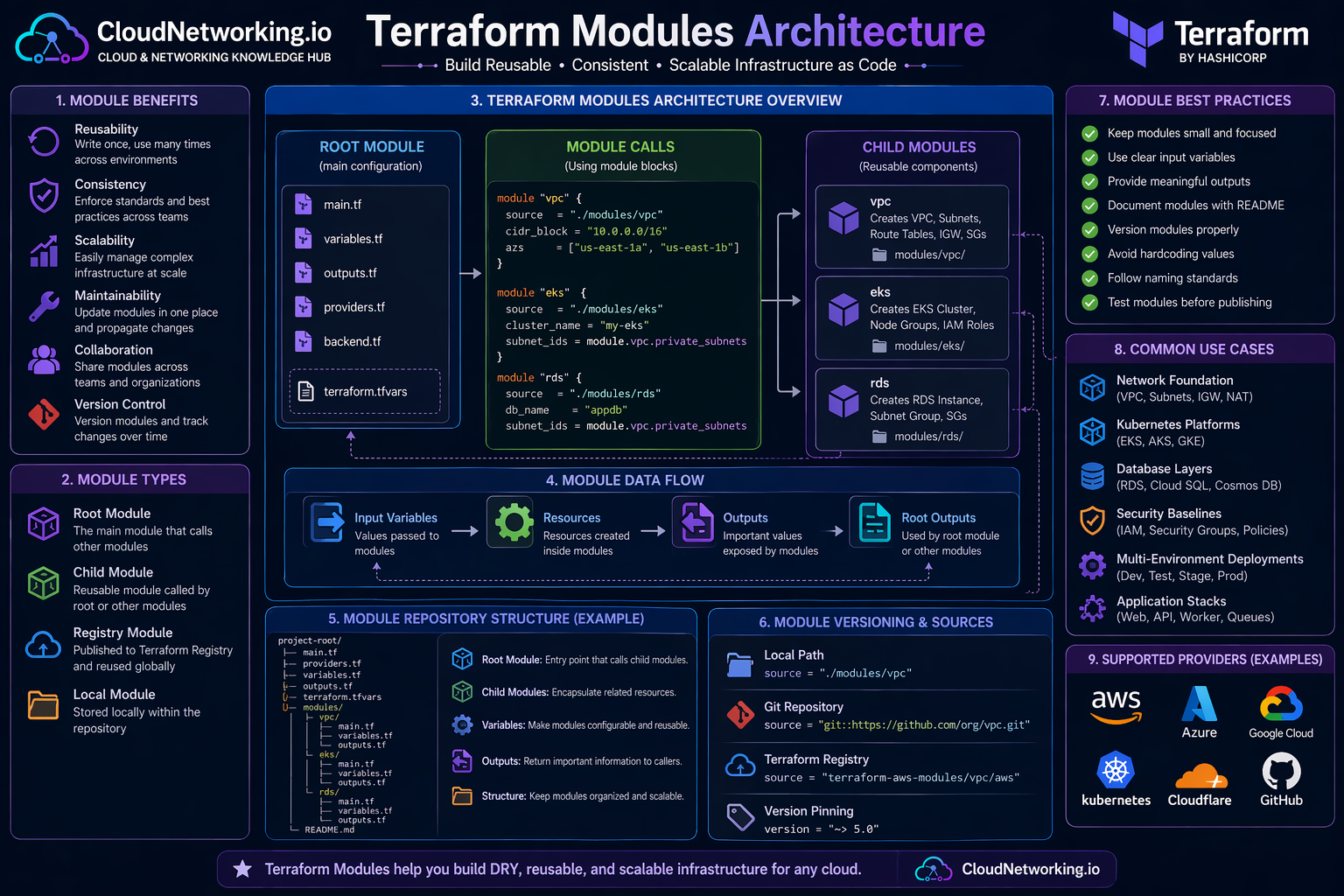
Terraform modules are easier to understand visually. The root module acts as the main entry point. It passes input variables into child modules. Child modules create resources and return outputs such as VPC IDs, subnet IDs, database endpoints, cluster names, storage bucket names, or load balancer DNS names.
Root module, child modules, inputs, outputs, reusable infrastructure and team-friendly design.
Keep one strong video near the top so visitors can immediately understand the purpose of Terraform modules before going into folder structure and code examples.
Terraform modules overview and reusable infrastructure learning video.
A Terraform module is a container for Terraform configuration files that are used together. Every Terraform project has at least one module: the root module. When that root module calls another reusable package of Terraform code, the called package is known as a child module.
In simple terms, Terraform resources are individual infrastructure objects, while Terraform modules are reusable groups of resources. A VPC module may include a VPC, subnets, route tables, internet gateway, NAT gateway, security groups, and outputs. An EKS module may include the cluster, node groups, IAM roles, security groups, and outputs.
Instead of writing the same Terraform resources again and again, you group related resources into a module and call that module wherever the same pattern is needed.
A platform team can create approved modules for networking, Kubernetes, databases, security baselines, logging, and application stacks. Other teams consume those modules with simple input values.
module "network" {
  source = "./modules/vpc"

  environment = "dev"
  vpc_cidr    = "10.10.0.0/16"
}Without modules, Terraform code can become repetitive very quickly. The same subnet logic, IAM logic, tagging logic, security group rules, storage settings, and naming standards may be copied across multiple projects. That creates maintenance issues and inconsistent infrastructure.
Write infrastructure logic once and reuse it across dev, test, staging, production, multiple applications, or multiple cloud accounts.
Modules help teams apply the same tags, naming standards, security controls, logging settings, and architecture patterns.
When a pattern changes, the module can be improved centrally instead of fixing copied code across many repositories.
Platform teams can build and own modules while application teams consume approved infrastructure patterns safely.
New environments can be created faster because teams reuse tested infrastructure blocks instead of designing everything from scratch.
Modules allow organizations to enforce approved designs, required encryption, standard tags, subnet patterns, and compliance rules.
Root and child modules are two of the most important Terraform module terms. Understanding this relationship makes module design much easier.
The root module is the Terraform working directory where you run commands such as `terraform init`, `terraform plan`, and `terraform apply`.
A child module is a reusable module called from the root module or from another module using a `module` block.
The `module` block defines where the child module source is located and what input values should be passed into it.
| Module type | Meaning | Example location | Typical responsibility |
|---|---|---|---|
| Root module | Main Terraform configuration where commands are executed. | `environments/dev/` or project root | Calls modules, configures providers, manages backend, passes inputs. |
| Child module | Reusable Terraform package called by another module. | `modules/vpc/` or registry module source | Creates a focused infrastructure pattern such as VPC, EKS, RDS, or S3. |
| Nested module | A module called from inside another child module. | `modules/platform/` calling `modules/vpc/` | Useful in advanced patterns, but should be used carefully to avoid complexity. |
module "vpc" {
  source = "../../modules/vpc"

  name        = "cloudnetworking-dev"
  environment = "dev"
  vpc_cidr    = "10.10.0.0/16"
}A clean folder structure is one of the strongest parts of a good Terraform module strategy. The goal is to separate reusable modules from environment-specific configuration. Modules should define reusable building blocks. Environment folders should call those modules with different values.
terraform/
├── modules/
│   ├── vpc/
│   │   ├── main.tf
│   │   ├── variables.tf
│   │   ├── outputs.tf
│   │   ├── versions.tf
│   │   └── README.md
│   ├── eks/
│   │   ├── main.tf
│   │   ├── variables.tf
│   │   ├── outputs.tf
│   │   ├── versions.tf
│   │   └── README.md
│   ├── rds/
│   │   ├── main.tf
│   │   ├── variables.tf
│   │   ├── outputs.tf
│   │   ├── versions.tf
│   │   └── README.md
│   └── s3/
│       ├── main.tf
│       ├── variables.tf
│       ├── outputs.tf
│       ├── versions.tf
│       └── README.md
├── environments/
│   ├── dev/
│   │   ├── main.tf
│   │   ├── providers.tf
│   │   ├── backend.tf
│   │   ├── variables.tf
│   │   ├── terraform.tfvars
│   │   └── outputs.tf
│   ├── staging/
│   │   ├── main.tf
│   │   ├── providers.tf
│   │   ├── backend.tf
│   │   ├── variables.tf
│   │   ├── terraform.tfvars
│   │   └── outputs.tf
│   └── prod/
│       ├── main.tf
│       ├── providers.tf
│       ├── backend.tf
│       ├── variables.tf
│       ├── terraform.tfvars
│       └── outputs.tf
└── README.mdContains reusable infrastructure components such as VPC, EKS, RDS, S3, IAM, networking, or monitoring modules.
Contains root module configurations for dev, staging, prod, or different cloud accounts and subscriptions.
Explain module purpose, required inputs, optional inputs, outputs, examples, and version notes.
Inputs and outputs are the contract between the root module and child modules. Inputs allow the caller to customize the module. Outputs allow the module to return important values after resources are created.
Inputs are variables passed into a module. Examples include `vpc_cidr`, `environment`, `subnet_cidrs`, `tags`, `instance_type`, or `enable_nat_gateway`.
Outputs expose useful values from a module. Examples include `vpc_id`, `public_subnet_ids`, `private_subnet_ids`, `database_endpoint`, or `cluster_name`.
variable "name" {
  description = "Name prefix for resources created by this module"
  type        = string
}

variable "environment" {
  description = "Environment name such as dev, staging, or prod"
  type        = string
}

variable "vpc_cidr" {
  description = "CIDR block for the VPC"
  type        = string
}

variable "public_subnet_cidrs" {
  description = "List of public subnet CIDR blocks"
  type        = list(string)
}

variable "private_subnet_cidrs" {
  description = "List of private subnet CIDR blocks"
  type        = list(string)
}

variable "tags" {
  description = "Common resource tags"
  type        = map(string)
  default     = {}
}output "vpc_id" {
description = "ID of the created VPC"
value = aws_vpc.main.id
}
output "public_subnet_ids" {
description = "IDs of public subnets"
value = aws_subnet.public[*].id
}
output "private_subnet_ids" {
description = "IDs of private subnets"
value = aws_subnet.private[*].id
}The best way to understand modules is to build a small reusable module. This example shows a simplified AWS VPC module pattern. In a production module, you may add NAT Gateways, route tables, security groups, VPC endpoints, flow logs, tagging rules, and additional controls.
resource "aws_vpc" "main" {
  cidr_block           = var.vpc_cidr
  enable_dns_hostnames = true
  enable_dns_support   = true

  tags = merge(var.tags, {
    Name        = "${var.name}-vpc"
    Environment = var.environment
    ManagedBy   = "terraform"
  })
}

resource "aws_subnet" "public" {
  count = length(var.public_subnet_cidrs)

  vpc_id                  = aws_vpc.main.id
  cidr_block              = var.public_subnet_cidrs[count.index]
  map_public_ip_on_launch = true

  tags = merge(var.tags, {
    Name        = "${var.name}-public-${count.index + 1}"
    Environment = var.environment
    Tier        = "public"
  })
}

resource "aws_subnet" "private" {
  count = length(var.private_subnet_cidrs)

  vpc_id     = aws_vpc.main.id
  cidr_block = var.private_subnet_cidrs[count.index]

  tags = merge(var.tags, {
    Name        = "${var.name}-private-${count.index + 1}"
    Environment = var.environment
    Tier        = "private"
  })
}

resource "aws_internet_gateway" "main" {
  vpc_id = aws_vpc.main.id

  tags = merge(var.tags, {
    Name        = "${var.name}-igw"
    Environment = var.environment
  })
}module "vpc" {
source = "../../modules/vpc"
name = "cloudnetworking-dev"
environment = "dev"
vpc_cidr = "10.10.0.0/16"
public_subnet_cidrs = [
"10.10.1.0/24",
"10.10.2.0/24"
]
private_subnet_cidrs = [
"10.10.11.0/24",
"10.10.12.0/24"
]
tags = {
Project = "cloudnetworking"
Owner = "platform-team"
}
}output "vpc_id" {
description = "VPC ID from the VPC module"
value = module.vpc.vpc_id
}
output "public_subnet_ids" {
description = "Public subnet IDs from the VPC module"
value = module.vpc.public_subnet_ids
}
output "private_subnet_ids" {
description = "Private subnet IDs from the VPC module"
value = module.vpc.private_subnet_ids
}In many organizations, Terraform modules are owned by cloud platform teams. The platform team creates approved modules for networking, identity, compute, Kubernetes, storage, security, observability, and databases. Application teams then consume those approved modules instead of building infrastructure from scratch.
Defines VPCs, VNets, subnets, route tables, NAT, firewall rules, endpoints, and connectivity standards.
Defines EKS, AKS, or GKE clusters with node pools, IAM roles, logging, security groups, and baseline settings.
Enforces encryption, logging, IAM policies, security baselines, required tags, and compliance guardrails.
Creates RDS, Cloud SQL, Cosmos DB, backups, subnet groups, security groups, and endpoint outputs.
Configures logs, metrics, alarms, dashboards, alerting, monitoring agents, or integrations.
Bundles load balancer, compute, DNS, certificate, security rules, and scaling configuration into a reusable pattern.
Terraform modules can come from local folders, Git repositories, public registry modules, private registry modules, or internal source control repositories. For professional usage, versioning is very important because it prevents unexpected changes from breaking infrastructure.
| Module source type | Example | Best use case | Important note |
|---|---|---|---|
| Local module | `source = "../../modules/vpc"` | Small repos, learning, monorepo-style infrastructure. | Easy to start, but versioning is repo-based. |
| Git module | `source = "git::https://example.com/modules.git//vpc?ref=v1.2.0"` | Internal reusable modules stored in Git. | Use tags or commit references for stable versions. |
| Public Registry | `source = "terraform-aws-modules/vpc/aws"` | Well-known community modules. | Review module behavior before using in production. |
| Private Registry | `source = "app.terraform.io/org/vpc/aws"` | Enterprise module sharing and governance. | Useful for platform teams and controlled adoption. |
module "vpc" {
  source  = "terraform-aws-modules/vpc/aws"
  version = "~> 5.0"

  name = "cloudnetworking-prod"
  cidr = "10.20.0.0/16"

  azs             = ["us-east-1a", "us-east-1b"]
  private_subnets = ["10.20.11.0/24", "10.20.12.0/24"]
  public_subnets  = ["10.20.1.0/24", "10.20.2.0/24"]
}Terraform modules become more valuable when combined with Git and CI/CD. A pipeline can validate modules, run formatting checks, scan IaC security, generate plans, require approvals, and apply changes safely.
Use the same modules to create dev, staging, and production with different variable values.
Reusable modules reduce large repeated code blocks, making changes easier to review.
Pipelines can run plan, security checks, and manual approvals before applying module changes.
Approved modules can enforce tags, encryption, logging, backup, IAM, and network standards.
Teams avoid manual portal steps and use tested module logic instead.
Modules become the product that platform teams offer to application teams.
terraform fmt -check
terraform init
terraform validate
terraform planTerraform modules are useful whenever infrastructure patterns repeat. They are especially powerful in cloud foundations, platform engineering, DevOps automation, and multi-environment infrastructure delivery.
Creates VPC, public subnets, private subnets, route tables, NAT Gateways, Internet Gateway, VPC endpoints, and flow logs.
Creates Kubernetes clusters, node pools, IAM roles, security groups, logging configuration, and output values for deployments.
Creates subnet groups, database instances, parameter groups, backups, monitoring, security groups, and endpoint outputs.
Creates buckets with encryption, versioning, lifecycle policies, access controls, logging, and standard tags.
Builds account, subscription, networking, logging, identity, security, and governance foundations.
Creates load balancer, compute layer, DNS record, certificate, security groups, autoscaling, and outputs.
Modules can make Terraform clean and powerful, but poorly designed modules can also make infrastructure harder to understand. Good modules are focused, documented, versioned, and predictable.
A module should solve one clear infrastructure problem. Avoid creating one giant module that tries to manage the entire platform.
Inputs should be easy to understand. Names like `vpc_cidr`, `environment`, and `private_subnet_cidrs` are better than vague names.
Return values that other modules or root configurations actually need, such as IDs, ARNs, endpoints, and names.
Add README files with purpose, inputs, outputs, examples, provider requirements, and upgrade notes.
Use Git tags, registry versions, or release versions so teams can upgrade modules intentionally.
Hardcoded names, CIDRs, regions, account IDs, and tags reduce reusability and create future maintenance problems.
Use variable validation for important values such as environment names, allowed instance types, or CIDR patterns.
Use provider version constraints so module behavior does not unexpectedly change after provider updates.
Run fmt, validate, plan, security checks, and test deployments before publishing shared modules.
variable "environment" {
  description = "Deployment environment"
  type        = string

  validation {
    condition     = contains(["dev", "staging", "prod"], var.environment)
    error_message = "Environment must be one of: dev, staging, prod."
  }
}Terraform modules are useful only when they simplify infrastructure. If modules become too abstract, too large, or poorly documented, they can make Terraform harder instead of easier.
| Mistake | Why it is a problem | Better approach |
|---|---|---|
| Creating huge modules | Large modules become hard to understand, test, and reuse. | Keep modules focused on clear infrastructure patterns. |
| Hardcoding values | Hardcoded regions, names, CIDRs, and account IDs reduce flexibility. | Use variables and environment-specific values. |
| No versioning | Teams may accidentally consume breaking changes. | Use Git tags or registry versions. |
| Too many nested modules | Deep nesting can make the infrastructure flow difficult to trace. | Use nesting only when it improves clarity. |
| Weak outputs | Other modules may not get the IDs or endpoints they need. | Expose practical outputs such as IDs, ARNs, names, and endpoints. |
| No documentation | Other teams may misuse the module or avoid it completely. | Add README examples, input tables, output tables, and usage notes. |
This modules page should connect strongly with the main Terraform hub and future practical Terraform pages. The best traffic usually comes from pages that solve specific implementation searches such as AWS VPC, commands, state, and interview questions.
| Priority | Page topic | Why it helps traffic | Recommended URL |
|---|---|---|---|
| 1 | Terraform AWS VPC | High demand for practical VPC code, subnet design, route tables, NAT Gateway, and diagrams. | /terraform/aws-vpc/ |
| 2 | Terraform Commands | Beginner-friendly searches for init, plan, apply, destroy, import, state, fmt, and validate. | /terraform/commands/ |
| 3 | Terraform State | Important topic for remote state, locking, backend design, team workflows, and troubleshooting. | /terraform/state/ |
| 4 | Terraform Interview Questions | Strong search demand from DevOps engineers preparing for interviews. | /terraform/interview-questions/ |
| 5 | Terraform AWS EKS | Strong DevOps and Kubernetes traffic with practical real-world relevance. | /terraform/aws-eks/ |
These videos support the written guide and help visitors understand Terraform modules, reusable design, structure, inputs, outputs, and practical module workflows.
Terraform modules structure and reusable infrastructure design.
Terraform module examples and practical learning.
Terraform automation and module usage patterns.
Terraform modules and reusable IaC workflow video.
Use these official references when you need deeper implementation details, module source syntax, registry usage, module publishing, and Terraform language behavior.
Official documentation for module usage, structure, child modules, inputs, outputs, and source options.
Open modules docs →Official module block syntax reference for source, version, providers, inputs, and module behavior.
Open syntax docs →Official registry for Terraform providers and modules across AWS, Azure, Google Cloud, Kubernetes, and more.
Open registry →Hands-on official tutorials for learning Terraform modules and infrastructure as code workflows.
Open module tutorials →Official language reference for variables, outputs, expressions, resources, providers, and module design.
Open language docs →Official CLI documentation for init, validate, plan, apply, state, import, output, and module workflows.
Open CLI docs →