VPC CIDR
The primary IP range for the VPC, such as `10.0.0.0/16`. Subnets are carved from this range.
AWS VPC is one of the best Terraform projects for learning real cloud networking. It teaches CIDR planning, public and private subnets, route tables, Internet Gateway, NAT Gateway, security groups, and reusable infrastructure design.
This guide shows how to create an AWS VPC with Terraform using a practical production-style layout: VPC, public subnets, private subnets, route tables, Internet Gateway, NAT Gateway, Elastic IP, security groups, variables, outputs, and module-ready structure.
A common Terraform AWS VPC design uses one VPC spread across multiple Availability Zones. Public subnets host internet-facing resources such as load balancers or bastion hosts. Private subnets host application servers, databases, Kubernetes nodes, and internal workloads. Internet Gateway enables public subnet internet access, while NAT Gateway allows private subnet workloads to reach the internet without being directly exposed.
VPC, Availability Zones, public/private subnets, Internet Gateway, NAT Gateway, route tables and security boundaries.
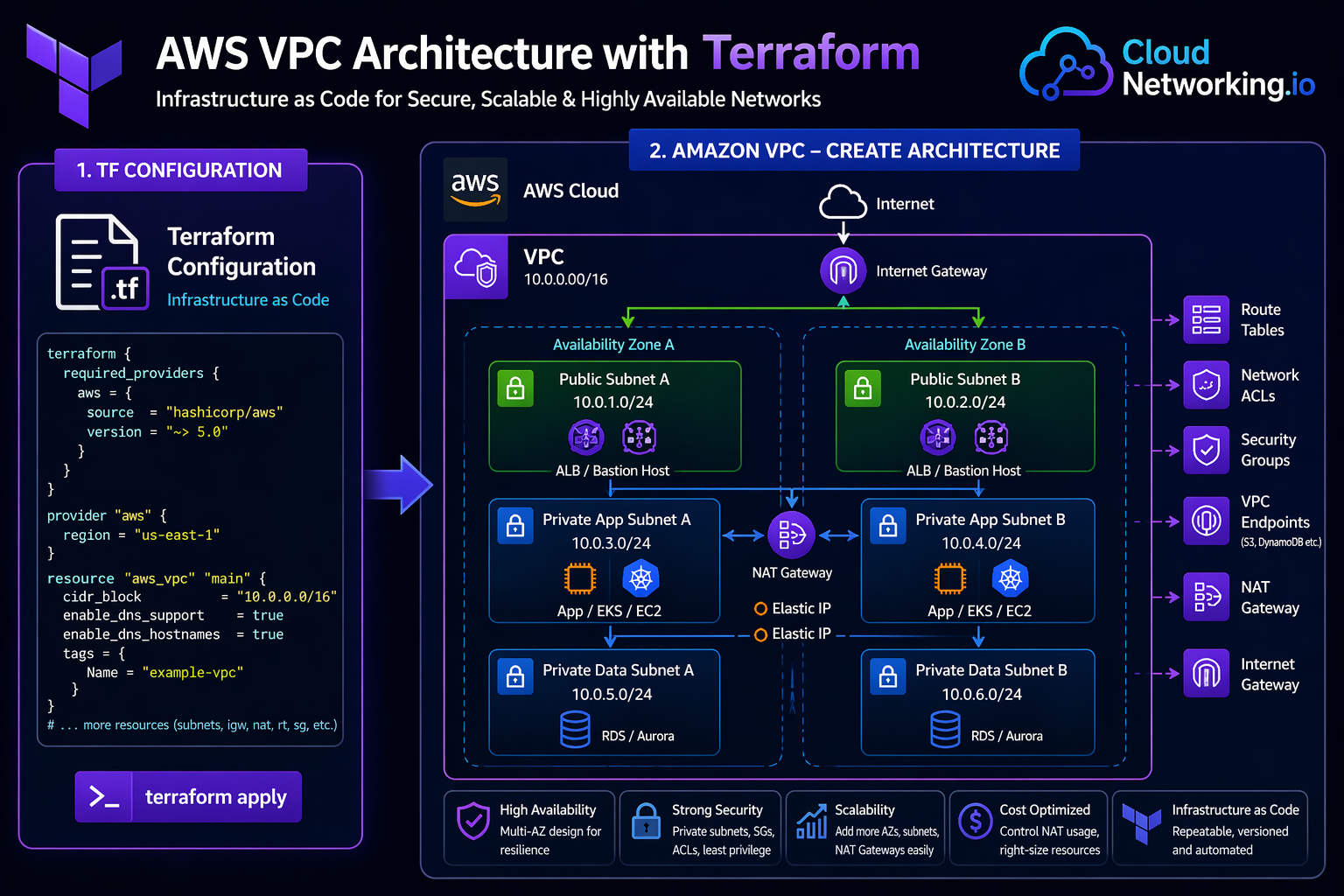
Amazon Virtual Private Cloud is a logically isolated network inside AWS. It lets you define IP ranges, subnets, routing, gateways, security groups, network ACLs, VPC endpoints, and connectivity patterns. Most AWS workloads such as EC2, RDS, EKS, ECS, Lambda networking, and load balancers depend on VPC design.
The primary IP range for the VPC, such as `10.0.0.0/16`. Subnets are carved from this range.
A subnet with a route to the Internet Gateway. Used for public-facing resources such as load balancers.
A subnet without direct inbound internet routing. Used for application, database, and internal workloads.
VPCs include many connected resources. Manually creating them in the AWS console can lead to inconsistent route tables, subnet mistakes, missing tags, and hard-to-repeat environments. Terraform makes the VPC design repeatable, reviewable, reusable, and suitable for CI/CD automation.
Create similar VPC designs across dev, staging, and production with different CIDR values.
Every subnet, route, NAT Gateway, and security rule can be reviewed before deployment.
Once the VPC pattern is tested, it can become a reusable Terraform module.
New environments can be created faster using Terraform variables and automation pipelines.
Tags, naming, routing, security, and subnet layout can follow approved platform standards.
Terraform plan helps detect when real AWS networking no longer matches your code.
| Component | Terraform resource | Purpose | Common design note |
|---|---|---|---|
| VPC | `aws_vpc` | Creates the isolated AWS network. | Choose CIDR carefully to avoid future overlap. |
| Public Subnet | `aws_subnet` | Subnet for internet-facing resources. | Route to Internet Gateway. |
| Private Subnet | `aws_subnet` | Subnet for internal workloads. | Route outbound traffic through NAT Gateway. |
| Internet Gateway | `aws_internet_gateway` | Allows public subnet internet connectivity. | Attach to the VPC and route public traffic to it. |
| Elastic IP | `aws_eip` | Static public IP for NAT Gateway. | NAT Gateway requires Elastic IP. |
| NAT Gateway | `aws_nat_gateway` | Allows private subnet workloads to access internet outbound. | Use one per AZ for high availability in production. |
| Route Table | `aws_route_table` | Controls traffic routing for subnets. | Use separate public and private route tables. |
| Security Group | `aws_security_group` | Stateful firewall for resources. | Keep rules minimal and specific. |
Start with a simple root module for learning. Later, move the VPC logic into `/modules/vpc/` and call it from `/environments/dev/`, `/environments/staging/`, and `/environments/prod/`.
terraform-aws-vpc/
├── main.tf
├── providers.tf
├── variables.tf
├── outputs.tf
├── terraform.tfvars
└── versions.tfterraform/
├── modules/
│ └── vpc/
│ ├── main.tf
│ ├── variables.tf
│ ├── outputs.tf
│ └── versions.tf
└── environments/
├── dev/
│ ├── main.tf
│ ├── providers.tf
│ ├── backend.tf
│ ├── variables.tf
│ └── terraform.tfvars
└── prod/
├── main.tf
├── providers.tf
├── backend.tf
├── variables.tf
└── terraform.tfvarsThis example creates a VPC with two public subnets, two private subnets, an Internet Gateway, one NAT Gateway, public and private route tables, route table associations, and a simple security group.
terraform {
  required_version = ">= 1.5.0"

  required_providers {
    aws = {
      source  = "hashicorp/aws"
      version = "~> 5.0"
    }
  }
}provider "aws" {
region = var.aws_region
}data "aws_availability_zones" "available" {
state = "available"
}
locals {
common_tags = {
Project = var.project_name
Environment = var.environment
ManagedBy = "terraform"
}
}
resource "aws_vpc" "main" {
cidr_block = var.vpc_cidr
enable_dns_hostnames = true
enable_dns_support = true
tags = merge(local.common_tags, {
Name = "${var.project_name}-${var.environment}-vpc"
})
}
resource "aws_internet_gateway" "main" {
vpc_id = aws_vpc.main.id
tags = merge(local.common_tags, {
Name = "${var.project_name}-${var.environment}-igw"
})
}
resource "aws_subnet" "public" {
count = length(var.public_subnet_cidrs)
vpc_id = aws_vpc.main.id
cidr_block = var.public_subnet_cidrs[count.index]
availability_zone = data.aws_availability_zones.available.names[count.index]
map_public_ip_on_launch = true
tags = merge(local.common_tags, {
Name = "${var.project_name}-${var.environment}-public-${count.index + 1}"
Tier = "public"
})
}
resource "aws_subnet" "private" {
count = length(var.private_subnet_cidrs)
vpc_id = aws_vpc.main.id
cidr_block = var.private_subnet_cidrs[count.index]
availability_zone = data.aws_availability_zones.available.names[count.index]
tags = merge(local.common_tags, {
Name = "${var.project_name}-${var.environment}-private-${count.index + 1}"
Tier = "private"
})
}
resource "aws_eip" "nat" {
domain = "vpc"
tags = merge(local.common_tags, {
Name = "${var.project_name}-${var.environment}-nat-eip"
})
}
resource "aws_nat_gateway" "main" {
allocation_id = aws_eip.nat.id
subnet_id = aws_subnet.public[0].id
tags = merge(local.common_tags, {
Name = "${var.project_name}-${var.environment}-nat-gateway"
})
depends_on = [aws_internet_gateway.main]
}
resource "aws_route_table" "public" {
vpc_id = aws_vpc.main.id
route {
cidr_block = "0.0.0.0/0"
gateway_id = aws_internet_gateway.main.id
}
tags = merge(local.common_tags, {
Name = "${var.project_name}-${var.environment}-public-rt"
})
}
resource "aws_route_table" "private" {
vpc_id = aws_vpc.main.id
route {
cidr_block = "0.0.0.0/0"
nat_gateway_id = aws_nat_gateway.main.id
}
tags = merge(local.common_tags, {
Name = "${var.project_name}-${var.environment}-private-rt"
})
}
resource "aws_route_table_association" "public" {
count = length(aws_subnet.public)
subnet_id = aws_subnet.public[count.index].id
route_table_id = aws_route_table.public.id
}
resource "aws_route_table_association" "private" {
count = length(aws_subnet.private)
subnet_id = aws_subnet.private[count.index].id
route_table_id = aws_route_table.private.id
}
resource "aws_security_group" "web" {
name = "${var.project_name}-${var.environment}-web-sg"
description = "Allow HTTP and HTTPS inbound traffic"
vpc_id = aws_vpc.main.id
ingress {
description = "Allow HTTP"
from_port = 80
to_port = 80
protocol = "tcp"
cidr_blocks = var.allowed_http_cidrs
}
ingress {
description = "Allow HTTPS"
from_port = 443
to_port = 443
protocol = "tcp"
cidr_blocks = var.allowed_https_cidrs
}
egress {
description = "Allow outbound traffic"
from_port = 0
to_port = 0
protocol = "-1"
cidr_blocks = ["0.0.0.0/0"]
}
tags = merge(local.common_tags, {
Name = "${var.project_name}-${var.environment}-web-sg"
})
}variable "aws_region" {
description = "AWS region where the VPC will be created"
type = string
default = "us-east-1"
}
variable "project_name" {
description = "Project name used for resource naming"
type = string
default = "cloudnetworking"
}
variable "environment" {
description = "Environment name such as dev, staging, or prod"
type = string
default = "dev"
}
variable "vpc_cidr" {
description = "CIDR block for the VPC"
type = string
default = "10.0.0.0/16"
}
variable "public_subnet_cidrs" {
description = "CIDR blocks for public subnets"
type = list(string)
default = ["10.0.1.0/24", "10.0.2.0/24"]
}
variable "private_subnet_cidrs" {
description = "CIDR blocks for private subnets"
type = list(string)
default = ["10.0.11.0/24", "10.0.12.0/24"]
}
variable "allowed_http_cidrs" {
description = "CIDR blocks allowed for HTTP inbound traffic"
type = list(string)
default = ["0.0.0.0/0"]
}
variable "allowed_https_cidrs" {
description = "CIDR blocks allowed for HTTPS inbound traffic"
type = list(string)
default = ["0.0.0.0/0"]
}aws_region = "us-east-1"
project_name = "cloudnetworking"
environment = "dev"
vpc_cidr = "10.0.0.0/16"
public_subnet_cidrs = [
"10.0.1.0/24",
"10.0.2.0/24"
]
private_subnet_cidrs = [
"10.0.11.0/24",
"10.0.12.0/24"
]output "vpc_id" {
description = "ID of the created VPC"
value = aws_vpc.main.id
}
output "public_subnet_ids" {
description = "IDs of public subnets"
value = aws_subnet.public[*].id
}
output "private_subnet_ids" {
description = "IDs of private subnets"
value = aws_subnet.private[*].id
}
output "nat_gateway_id" {
description = "ID of the NAT Gateway"
value = aws_nat_gateway.main.id
}
output "internet_gateway_id" {
description = "ID of the Internet Gateway"
value = aws_internet_gateway.main.id
}
output "web_security_group_id" {
description = "ID of the web security group"
value = aws_security_group.web.id
}terraform fmt
terraform init
terraform validate
terraform plan
terraform applyterraform destroyAfter testing the VPC code, move it into a reusable module. This allows dev, staging, and production environments to call the same VPC pattern with different CIDR blocks, names, and tags.
module "vpc" {
  source = "../../modules/vpc"

  project_name = "cloudnetworking"
  environment  = "dev"
  aws_region   = "us-east-1"

  vpc_cidr = "10.10.0.0/16"

  public_subnet_cidrs = [
    "10.10.1.0/24",
    "10.10.2.0/24"
  ]

  private_subnet_cidrs = [
    "10.10.11.0/24",
    "10.10.12.0/24"
  ]
}Use the same VPC module across multiple environments and AWS accounts.
Control naming, tags, subnets, routing, and network foundations from one pattern.
Run plan and apply from CI/CD using environment-specific tfvars files.
Avoid overlapping CIDRs with on-prem, VPN, Transit Gateway, peering, or future VPC networks.
Spread public and private subnets across at least two Availability Zones for high availability.
Use different route tables for public and private subnets to avoid accidental exposure.
Place app servers, databases, and Kubernetes worker nodes in private subnets where possible.
For production, consider one NAT Gateway per AZ. For labs, one NAT Gateway reduces cost.
Use standard tags for ownership, environment, cost center, application, and compliance.
For teams, store Terraform state remotely using S3 backend with locking instead of local state.
Route table and subnet changes can impact connectivity, so always review Terraform plan carefully.
Start simple, test the VPC, then move it into a reusable module for environments.
| Mistake | Impact | Better approach |
|---|---|---|
| Overlapping CIDR ranges | Breaks future VPN, VPC peering, Transit Gateway, and hybrid networking. | Plan IP ranges before creating the VPC. |
| Private subnet route to Internet Gateway | Private workloads may become incorrectly exposed. | Private subnet default route should point to NAT Gateway if outbound internet is needed. |
| No route table associations | Subnets may use unintended default route tables. | Explicitly associate route tables with subnets. |
| Using one AZ only | Poor availability and weak production design. | Use at least two Availability Zones. |
| Hardcoded values everywhere | Code is difficult to reuse for dev, staging, and production. | Use variables, locals, and tfvars files. |
| Leaving lab NAT Gateway running | Unexpected AWS cost. | Destroy lab resources after testing. |
A strong interview answer should not only say “I created a VPC.” It should explain network design, subnet tiers, routing, security, high availability, and why Terraform is useful.
I created an AWS VPC using Terraform with a custom CIDR block, public and private subnets across multiple Availability Zones, an Internet Gateway for public subnets, a NAT Gateway for private subnet outbound access, separate route tables, route table associations, and security groups. I used variables for environment-specific values and outputs for VPC and subnet IDs. After testing, I moved the design into a reusable Terraform module so dev, staging, and production environments could use the same standard network pattern.Know what VPC, subnet, route table, Internet Gateway, NAT Gateway, and security group mean.
Explain why public and private subnets need different routes.
Discuss multi-AZ design, NAT Gateway cost, VPC endpoints, Transit Gateway, and reusable modules.
Use these official references for deeper details on AWS VPC, Terraform AWS provider resources, route tables, NAT Gateway, and VPC networking behavior.
Official AWS documentation for Amazon Virtual Private Cloud concepts and configuration.
Open AWS VPC Docs →Official VPC user guide for subnets, routing, gateways, security, and connectivity.
Open VPC User Guide →Official Terraform AWS provider documentation for AWS resource management.
Open AWS Provider Docs →Official Terraform resource documentation for creating and managing AWS VPCs.
Open aws_vpc Docs →Learn how to convert this VPC into a reusable Terraform module.
Open Terraform Modules Guide →Return to the main Terraform learning hub for architecture, workflow, state, providers, and modules.
Open Terraform Hub →