Repeatability
Use the same code to create similar environments such as dev, test, staging, and production with fewer manual mistakes.
Terraform helps cloud and DevOps teams build infrastructure using code instead of manual portal changes. It turns infrastructure into versioned, reviewable, repeatable configuration that can be planned, approved, automated, and reused.
This Terraform hub explains the complete picture: architecture, providers, resources, modules, state, remote backends, commands, CI/CD workflows, AWS and multi-cloud use cases, production best practices, and real-world infrastructure automation patterns.
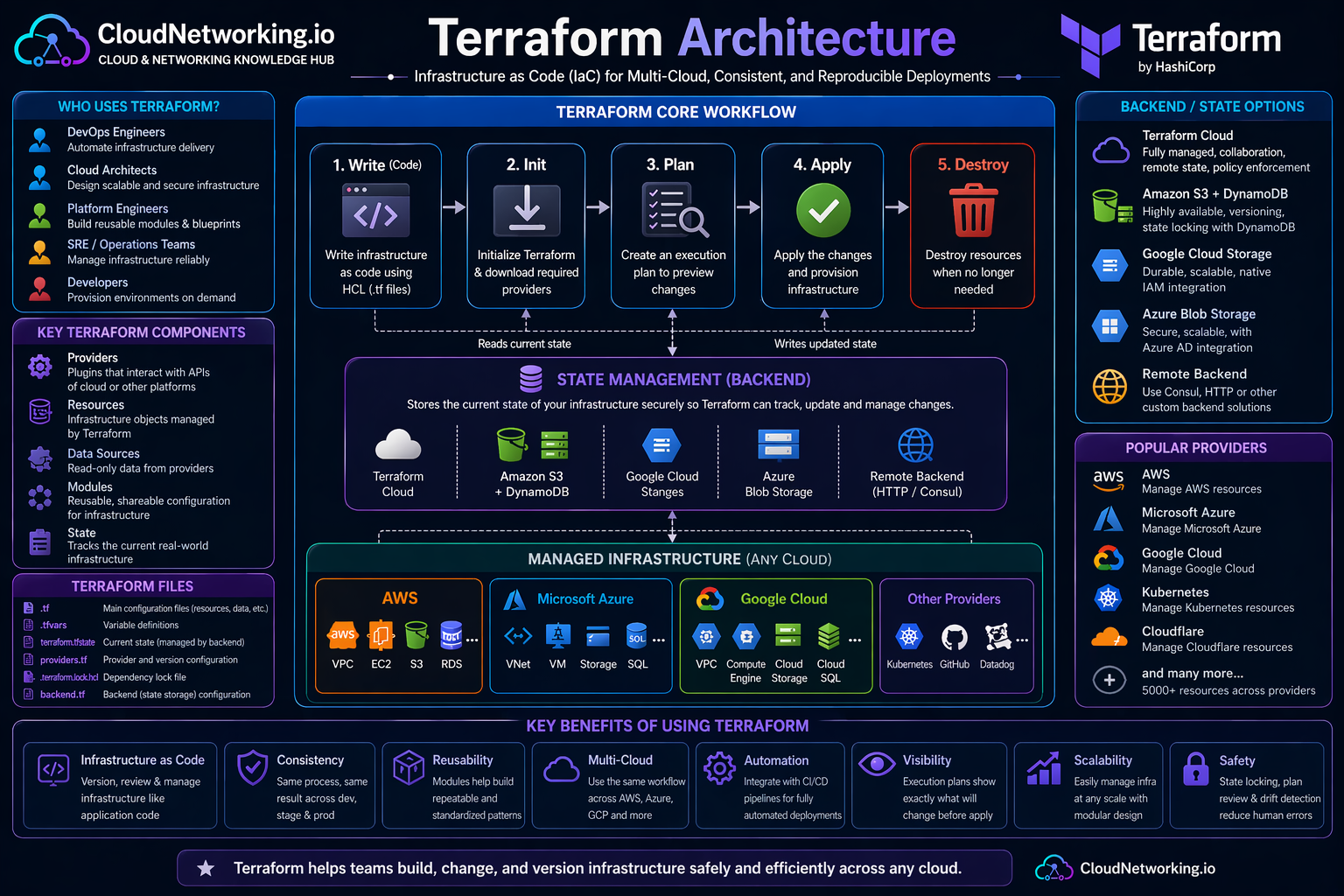
Terraform architecture is easier to understand when you see the complete flow together. A user writes Terraform configuration, initializes providers, creates a plan, applies the approved changes, and Terraform records infrastructure mappings in state. Remote backends make that state safer for teams.
How configuration, providers, modules, state, remote backends, and cloud infrastructure work together.
Watch a quick Terraform overview first, then use the sections below to understand architecture, workflow, state, modules, providers, and automation in more depth.
Terraform overview and infrastructure as code learning video.
Terraform is an infrastructure as code tool used to define and manage infrastructure through configuration files. Instead of creating resources manually in a cloud console, engineers describe the desired infrastructure in code and let Terraform calculate and apply the required changes.
Terraform is commonly used to provision networking, compute, storage, databases, Kubernetes clusters, IAM roles, DNS records, security groups, firewalls, monitoring integrations, and many other cloud resources.
Terraform is like a blueprint engine for infrastructure. You write the blueprint, Terraform compares it with the real environment, then creates or updates the resources needed to match the blueprint.
Terraform helps teams avoid manual cloud changes, reduce configuration drift, repeat deployments, standardize environments, and manage infrastructure through Git-based review workflows.
resource "aws_s3_bucket" "logs" {
  bucket = "cloudnetworking-demo-logs-bucket"

  tags = {
    Environment = "dev"
    ManagedBy   = "terraform"
  }
}Terraform solves a major cloud operations problem: manual infrastructure is difficult to repeat, audit, review, and scale. When infrastructure is managed through code, teams can use the same engineering practices used for application delivery.
Use the same code to create similar environments such as dev, test, staging, and production with fewer manual mistakes.
Store infrastructure code in Git so every change can be reviewed, tracked, reverted, and discussed.
Run Terraform through CI/CD pipelines to validate, plan, approve, and apply infrastructure changes safely.
Use modules and shared patterns so teams provision infrastructure consistently across projects.
Manage AWS, Azure, Google Cloud, Kubernetes, GitHub, Cloudflare, Datadog, and many more platforms using one workflow.
Terraform plan helps detect when real infrastructure differs from code-defined infrastructure.
Most Terraform confusion disappears once you understand the main building blocks: configuration files, providers, resources, variables, outputs, modules, state, and backends.
| Concept | Meaning | Example | Why it matters |
|---|---|---|---|
| Configuration | Terraform code written in `.tf` files. | `main.tf`, `variables.tf`, `outputs.tf` | Defines the desired infrastructure. |
| Provider | Plugin that talks to an external API. | AWS, AzureRM, Google, Kubernetes | Allows Terraform to manage real platforms. |
| Resource | Infrastructure object managed by Terraform. | VPC, EC2, S3 bucket, subnet, IAM role | Represents what Terraform creates or updates. |
| Data Source | Reads existing information without creating it. | Existing VPC, AMI, subnet, certificate | Useful when combining new and existing infrastructure. |
| Variable | Input value used to make code reusable. | `region`, `vpc_cidr`, `environment` | Avoids hardcoding values. |
| Output | Value printed or shared after apply. | VPC ID, endpoint URL, subnet IDs | Helps connect modules and pipelines. |
| Module | Reusable Terraform package. | VPC module, EKS module, S3 module | Improves reuse, standards, and maintainability. |
| State | Mapping between Terraform code and real infrastructure. | `terraform.tfstate` | Critical for tracking infrastructure changes. |
| Backend | Where Terraform stores state. | S3, Azure Blob, GCS, Terraform Cloud | Needed for safe team collaboration. |
Terraform uses a predictable workflow. This is one of the main reasons it works well in production environments and CI/CD pipelines.
terraform fmt
terraform init
terraform validate
terraform plan
terraform apply
terraform output
terraform destroyTerraform state tracks the relationship between your code and the real infrastructure. When Terraform creates a resource, it records important information in state. During future runs, Terraform compares configuration, state, and provider data to decide what should change.
State helps Terraform know which real resources belong to which Terraform configuration. Without state, Terraform cannot safely decide whether to create, update, or destroy resources.
For teams, local state is risky. Remote backends help centralize state, support collaboration, enable locking, and reduce accidental overwrites.
Common pattern: S3 bucket for state storage and DynamoDB for state locking.
Common pattern: Azure Blob Storage container for Terraform state.
Common pattern: Google Cloud Storage bucket for remote state.
terraform {
  backend "s3" {
    bucket         = "company-terraform-state"
    key            = "network/dev/terraform.tfstate"
    region         = "us-east-1"
    dynamodb_table = "company-terraform-locks"
    encrypt        = true
  }
}Modules are how Terraform becomes scalable. Instead of repeating the same VPC, subnet, security group, storage, or Kubernetes configuration in every project, teams create reusable modules and call them with different input values.
Create one approved VPC module and reuse it across dev, test, staging, and production.
Open Terraform Modules Guide →Modules help platform teams enforce naming, tags, security rules, CIDR patterns, logging, and governance.
Application teams can consume simple module inputs instead of managing hundreds of low-level resources.
module "network" {
  source = "./modules/vpc"

  environment          = "dev"
  vpc_cidr             = "10.10.0.0/16"
  public_subnet_cidrs  = ["10.10.1.0/24", "10.10.2.0/24"]
  private_subnet_cidrs = ["10.10.11.0/24", "10.10.12.0/24"]
}Providers are plugins that allow Terraform to communicate with external APIs. The AWS provider manages AWS resources, the AzureRM provider manages Azure resources, the Google provider manages Google Cloud resources, and the Kubernetes provider manages Kubernetes resources.
Used for VPC, EC2, S3, IAM, RDS, EKS, Lambda, Route 53, CloudFront, and many other AWS services.
Used for VNets, AKS, storage accounts, App Gateway, Key Vault, private endpoints, and Azure infrastructure.
Used for namespaces, deployments, services, config maps, secrets, and Kubernetes platform resources.
terraform {
  required_providers {
    aws = {
      source  = "hashicorp/aws"
      version = "~> 5.0"
    }
  }
}

provider "aws" {
  region = var.aws_region
}The best Terraform pages for traffic usually solve real problems. Users search for Terraform examples such as AWS VPC, EC2, S3, EKS, Lambda, IAM, and RDS. This hub should link to those deep-dive pages as you create them.
variable "environment" {
  description = "Environment name such as dev, test, staging, or prod"
  type        = string
  default     = "dev"
}

variable "aws_region" {
  description = "AWS region where resources will be deployed"
  type        = string
  default     = "us-east-1"
}locals {
common_tags = {
Project = "cloudnetworking"
Environment = var.environment
ManagedBy = "terraform"
}
}output "bucket_name" {
description = "Name of the created S3 bucket"
value = aws_s3_bucket.logs.bucket
}Create `/terraform/aws-vpc/` with full VPC code, public/private subnets, NAT Gateway, route tables, security groups, and diagram.
Create `/terraform/aws-ec2/` with key pair, security group, user data, IAM role, and common troubleshooting.
Create `/terraform/commands/` with command explanations, examples, and real-world usage notes.
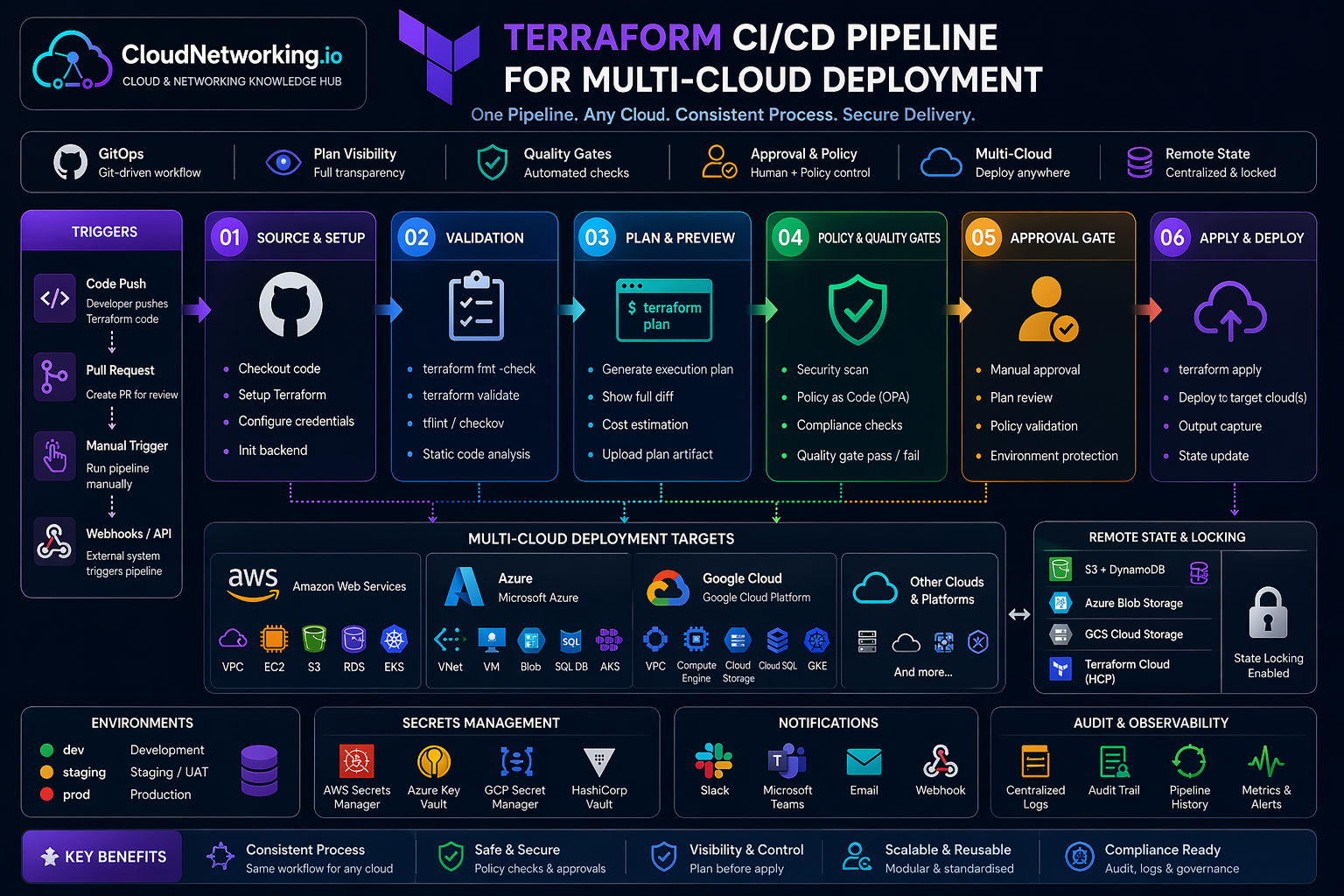
In real DevOps teams, Terraform is usually connected to Git and CI/CD. Engineers raise a pull request, the pipeline runs format, validation, security checks, and plan. After approval, the apply stage runs in a controlled environment across AWS, Azure, Google Cloud, Kubernetes, or other supported platforms.
One common pipeline pattern for source control, validation, planning, policy checks, approval, apply, state locking, secrets, notifications, and audit visibility.
name: Terraform Plan

on:
  pull_request:
    branches:
      - main

jobs:
  terraform:
    runs-on: ubuntu-latest

    steps:
      - name: Checkout
        uses: actions/checkout@v4

      - name: Setup Terraform
        uses: hashicorp/setup-terraform@v3

      - name: Terraform Init
        run: terraform init

      - name: Terraform Format
        run: terraform fmt -check

      - name: Terraform Validate
        run: terraform validate

      - name: Terraform Plan
        run: terraform plan
Terraform can be simple for small labs, but production usage needs standards. These practices help avoid state corruption, accidental deletes, duplicated code, environment confusion, and unsafe changes.
Use S3, Azure Blob, GCS, or Terraform Cloud instead of local state for shared environments.
State locking prevents multiple users or pipelines from applying changes at the same time.
Keep dev, test, staging, and production state separate to reduce blast radius.
Create reusable modules, but avoid overcomplicating simple resources with unnecessary abstraction.
Provider version constraints reduce unexpected behavior when providers introduce changes.
Always inspect the plan before apply, especially when it includes replacements or destroys.
Use branch protection, manual approvals, separate credentials, and restricted apply permissions.
Avoid hardcoding secrets in `.tf` files or `.tfvars`. Use secret managers where possible.
Use common tags for cost tracking, ownership, environment, project, and compliance.
For traffic and user value, your Terraform section should grow from this hub page into deep practical pages. The hub explains concepts; child pages solve specific user searches.
| Priority | Page | Why it matters | Recommended URL |
|---|---|---|---|
| 1 | Terraform Modules | Deep dive into reusable Terraform modules with real-world examples. | /terraform/modules/ |
| 2 | Terraform AWS VPC | Very strong traffic potential because many users search for Terraform VPC examples. | /terraform/aws-vpc/ |
| 3 | Terraform Commands | Beginner-friendly and strong for quick search traffic. | /terraform/commands/ |
| 4 | Terraform Interview Questions | High search demand and good for DevOps interview traffic. | /terraform/interview-questions/ |
| 5 | Terraform State | Important advanced topic with strong practical value. | /terraform/state/ |
| 6 | Terraform AWS EKS | Very useful for Kubernetes, DevOps, platform engineering, and AWS traffic. | /terraform/aws-eks/ |
These Terraform videos support the written guide and give visitors multiple learning options without leaving the page.
Terraform concepts, commands, and usage flow.
Terraform infrastructure as code learning video.
Terraform automation and workflow explanation.
Terraform practical learning and infrastructure automation.
Terraform real-world learning and DevOps practices.
Use these official references for deeper implementation details, provider-specific options, CLI usage, backend configuration, state behavior, and tutorials.
Official documentation for Terraform CLI, language, workflow, providers, modules, state, and backends.
Open Terraform Docs →Official reference for configuration syntax, resources, variables, outputs, expressions, and modules.
Open Language Docs →Official reference for init, fmt, validate, plan, apply, destroy, import, state, output, and workspace commands.
Open CLI Docs →Official registry for Terraform providers and modules across AWS, Azure, Google Cloud, Kubernetes, and more.
Open Registry →Hands-on official tutorials for learning Terraform from basic usage to more advanced workflows.
Open Tutorials →Official explanation of Terraform state, remote state, locking, and state management concepts.
Open State Docs →