Terraform Commands Explained
Terraform commands are the operational interface between your infrastructure code and real cloud infrastructure. Commands like terraform init, terraform plan, terraform apply, and terraform destroy control how configuration is initialized, reviewed, deployed, updated, and removed.
This guide explains Terraform commands in a real DevOps style: what each command does, when to use it, what it changes, how state is involved, how providers interact with AWS/Azure/GCP/Kubernetes, and how teams safely use Terraform in CI/CD pipelines.
Command flow at a glance
Most Terraform workflows follow a safe repeatable loop: initialize, validate, preview, apply, inspect outputs, and manage state carefully.
Terraform command architecture diagram
The diagram below shows how Terraform commands connect configuration files, variables, provider plugins, state files, remote backends, real infrastructure, output values, and CI/CD consumers.
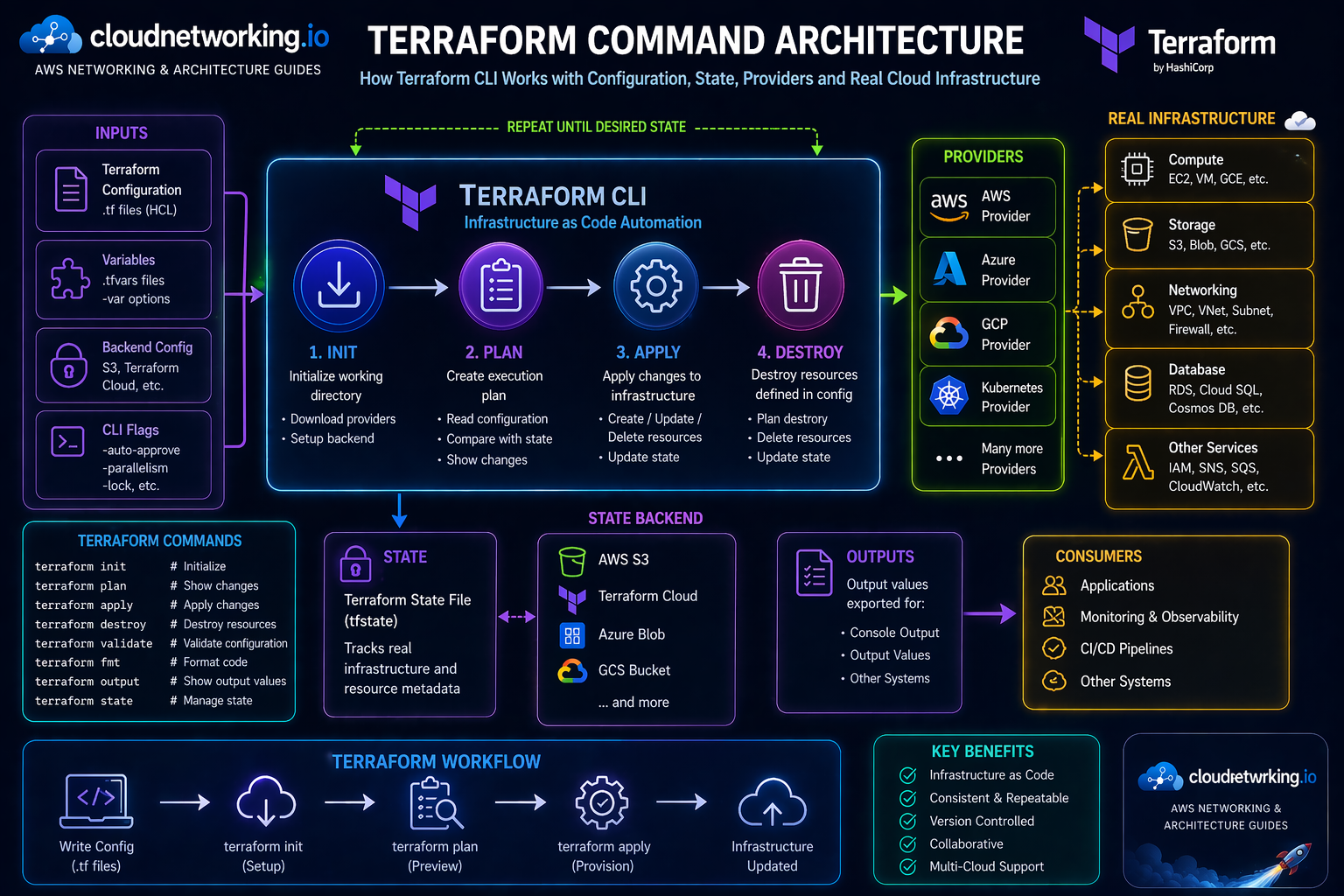
Commands are the workflow
Terraform commands are how engineers initialize, validate, preview, apply, inspect, and safely manage infrastructure changes.
State is central
Terraform uses state to map your configuration to real resources, so state commands must be handled carefully.
Providers do the work
Terraform CLI uses provider plugins to talk to AWS, Azure, GCP, Kubernetes, and many other platforms.
CI/CD needs guardrails
In pipelines, plan reviews, approvals, locking, and backend design are critical for safe infrastructure delivery.
What are Terraform commands?
Terraform commands are CLI operations used to manage the full lifecycle of infrastructure as code. They tell Terraform when to initialize a working directory, validate code, calculate a change plan, apply infrastructure changes, destroy resources, inspect outputs, and manage state.
In simple terms, your Terraform files describe the desired infrastructure, but Terraform commands are what make the workflow happen. Without commands, the configuration is only text. With commands, Terraform can compare the desired state against the current state and create an execution plan.
- terraform init prepares the working directory.
- terraform validate checks syntax and internal consistency.
- terraform fmt formats Terraform files.
- terraform plan previews changes.
- terraform apply executes changes.
- terraform destroy removes managed infrastructure.
- terraform state inspects or manipulates state carefully.
Simple definition
Terraform commands are the CLI instructions used to convert Terraform configuration into controlled infrastructure actions.
Best mental model
Configuration is the design. Providers are the cloud connectors. State is the memory. Commands are the workflow engine.
Why Terraform commands matter
Safety
Commands like plan and validate help teams review before making real cloud changes.
Repeatability
The same commands can run locally or in CI/CD, making infrastructure delivery consistent.
Automation
Terraform commands are pipeline-friendly, allowing controlled infrastructure provisioning and updates.
Recommended Terraform command workflow
terraform init
terraform fmt
terraform validate
terraform plan
terraform apply
terraform outputterraform init
terraform fmt -check
terraform validate
terraform plan -out=tfplan
# Manual approval / pull request review
terraform apply tfplanTerraform commands cheat sheet
| Command | Purpose | Typical usage |
|---|---|---|
| terraform init | Initializes working directory, providers, modules, backend | First command in any Terraform folder |
| terraform fmt | Formats Terraform configuration files | Before commits and in CI checks |
| terraform validate | Validates syntax and configuration consistency | Before plan |
| terraform plan | Shows proposed infrastructure changes | Before apply and during pull requests |
| terraform apply | Applies the planned changes | After review and approval |
| terraform destroy | Destroys Terraform-managed resources | Temporary environments or cleanup |
| terraform output | Displays output values | After apply or for downstream use |
| terraform state | Inspects or modifies state | Advanced troubleshooting |
| terraform import | Imports existing infrastructure into state | Onboarding unmanaged resources |
| terraform graph | Generates dependency graph | Architecture and dependency analysis |
terraform init
terraform init prepares the working directory. It downloads required providers, initializes modules, and configures the backend used for state storage.
terraform init
terraform init -upgrade
terraform init -reconfigure
terraform init -backend-config=backend.hcl
terraform plan
terraform plan compares your desired configuration with the current state and shows what Terraform intends to create, update, or destroy.
terraform plan
terraform plan -var-file=dev.tfvars
terraform plan -out=tfplan
terraform show tfplan
terraform apply
terraform apply executes the changes described by a plan. This is the command that creates, updates, or deletes real infrastructure.
terraform apply
terraform apply tfplan
terraform apply -auto-approve-auto-approve for sensitive environments unless the pipeline has strong review and approval gates.terraform destroy
terraform destroy removes resources managed by the current Terraform state. It is powerful and should be controlled carefully.
terraform destroy
terraform destroy -var-file=dev.tfvars
terraform plan -destroyTerraform state commands
Terraform state is the metadata record that maps your Terraform configuration to real infrastructure. State commands are useful, but should be used with care.
| Command | Use |
|---|---|
| terraform state list | List resources tracked in state |
| terraform state show | Show detailed information about one resource |
| terraform state mv | Move state address when refactoring |
| terraform state rm | Remove resource from state without deleting real infrastructure |
| terraform import | Bring existing infrastructure under Terraform management |
Terraform commands in DevOps pipelines
Pull request workflow
- Run
terraform fmt -check - Run
terraform validate - Run
terraform plan - Attach plan output to pull request
- Require approval before apply
Deployment workflow
- Use remote backend and locking
- Apply only reviewed plans
- Separate workspaces or folders carefully
- Restrict destroy permissions
- Keep secrets out of state and logs
Terraform commands best practices
Always review plan
Do not run apply blindly. Plan output is the safety checkpoint before real infrastructure changes.
Use remote state
Remote backends improve collaboration, locking, and state safety compared to local-only state.
Automate validation
Run fmt, validate, and plan in CI/CD so issues are caught before merge or apply.
Protect destroy
Destroy should be gated carefully, especially for shared or important environments.
Version providers
Pin provider versions to reduce unexpected changes during init or upgrade.
Store plans carefully
Saved plan files can include sensitive data, so treat them carefully in pipelines.
Common Terraform command mistakes
Skipping plan review
Running apply without reviewing planned changes can delete or alter resources unexpectedly.
Using local state in teams
Local state creates collaboration problems and increases the risk of drift or state loss.
Wrong workspace or var-file
Applying with the wrong environment values is one of the most dangerous Terraform mistakes.
Manual cloud changes
Manual changes outside Terraform create drift and make plans harder to understand.
Unsafe state edits
State commands are powerful. A wrong state change can disconnect Terraform from real infrastructure.
No locking
Concurrent applies without locking can corrupt state or create unpredictable infrastructure changes.
Terraform commands troubleshooting guide
| Issue | Likely cause | Fix direction |
|---|---|---|
| init fails | Provider download, backend config, credentials, network issue | Check backend config, provider version, credentials, and internet/proxy access |
| plan shows unexpected changes | Drift, provider behavior, wrong variables | Check state, var-file, workspace, and manual cloud changes |
| apply fails halfway | Cloud API error, quota, permissions, dependency issue | Fix root error, rerun plan, and verify state consistency |
| state lock stuck | Interrupted apply or backend lock issue | Investigate carefully before force-unlock |
| destroy wants to remove too much | Wrong folder/workspace/state | Stop immediately and verify backend, workspace, and plan output |