Quick summary
Before going deeper, here is a simple way to think about VPC.
Watch: AWS VPC Explained (Hands-on)
Prefer video learning? This session explains AWS VPC concepts, architecture, and real-world usage with practical examples.
What is a VPC?
A VPC, or Virtual Private Cloud, is a logically isolated network inside AWS. Think of it as your own private digital land in the cloud. Inside that land, you decide the IP address range, how the network is divided, which resources are exposed to the internet, which resources stay private, and how traffic flows.
In practical terms, a VPC is where you launch and organize cloud resources such as EC2 instances, application servers, databases, Kubernetes worker nodes, load balancers, and internal services.
Real-life example
Imagine you are building a company office in a business park. The business park gives you a plot, but inside your own office compound you decide where the reception, employee work area, server room, storage room, and security gate will be placed.
In the same way, AWS gives you cloud infrastructure, but your VPC is the space where you design your own internal network layout.
Why is a VPC important?
A VPC matters because cloud resources should not simply sit in an open, unstructured environment. You need network boundaries, segmentation, and control. A VPC gives you that foundation.
Without a well-designed VPC, your workloads can become difficult to secure, difficult to scale, and difficult to troubleshoot. A strong VPC design helps you:
- Separate public-facing services from internal systems
- Control inbound and outbound traffic paths
- Apply layered security controls
- Support high availability across multiple Availability Zones
- Prepare for hybrid connectivity with on-prem or other networks
When do you use a VPC?
You use a VPC whenever you need structured networking in AWS. In reality, almost every serious AWS deployment uses a VPC because applications need private communication, routing, security boundaries, and internet access control.
Common situations include:
- Hosting a web application with public and private tiers
- Running databases that should not be internet-facing
- Deploying Kubernetes clusters such as EKS
- Connecting AWS to an office network or data center
- Separating environments such as dev, test, and production
Simple scenario
A startup runs a website in AWS. The website itself is public, but the application servers and database must remain private. A VPC lets the company build that design properly instead of placing everything in one open layer.
Where does a VPC fit in AWS architecture?
A VPC sits at the network core of your AWS environment. Many other AWS services connect to it, run inside it, or depend on it for network placement.
You can think of the architecture in layers:
- VPC defines the overall network boundary
- Subnets divide the network into smaller segments
- Route tables define where traffic goes
- Gateways enable internet or private connectivity
- Security groups and NACLs control allowed traffic
- Resources such as EC2, databases, and load balancers sit inside that design
That is why VPC is one of the first things cloud engineers plan before building serious workloads.
Who works with VPCs?
VPCs are relevant to multiple teams, not just network specialists.
- Cloud engineers design the network structure
- DevOps engineers deploy workloads into the correct subnets
- Platform engineers build shared cloud foundations
- Security teams review segmentation and access patterns
- Application teams depend on the VPC design for connectivity
In real organizations, VPC design is often a shared responsibility because networking, security, and application availability are closely connected.
How does a VPC work?
A VPC works by combining a few core building blocks into one network design. The most important parts are:
- CIDR block: defines the IP range of the VPC
- Subnets: split the VPC into public or private segments
- Route tables: decide where traffic is sent
- Internet Gateway: allows public internet access
- NAT Gateway: allows private resources to access the internet outbound
- Security Groups: control traffic at resource level
- Network ACLs: control traffic at subnet level
Together, these create a controlled network environment where you can securely run applications and scale them over time.
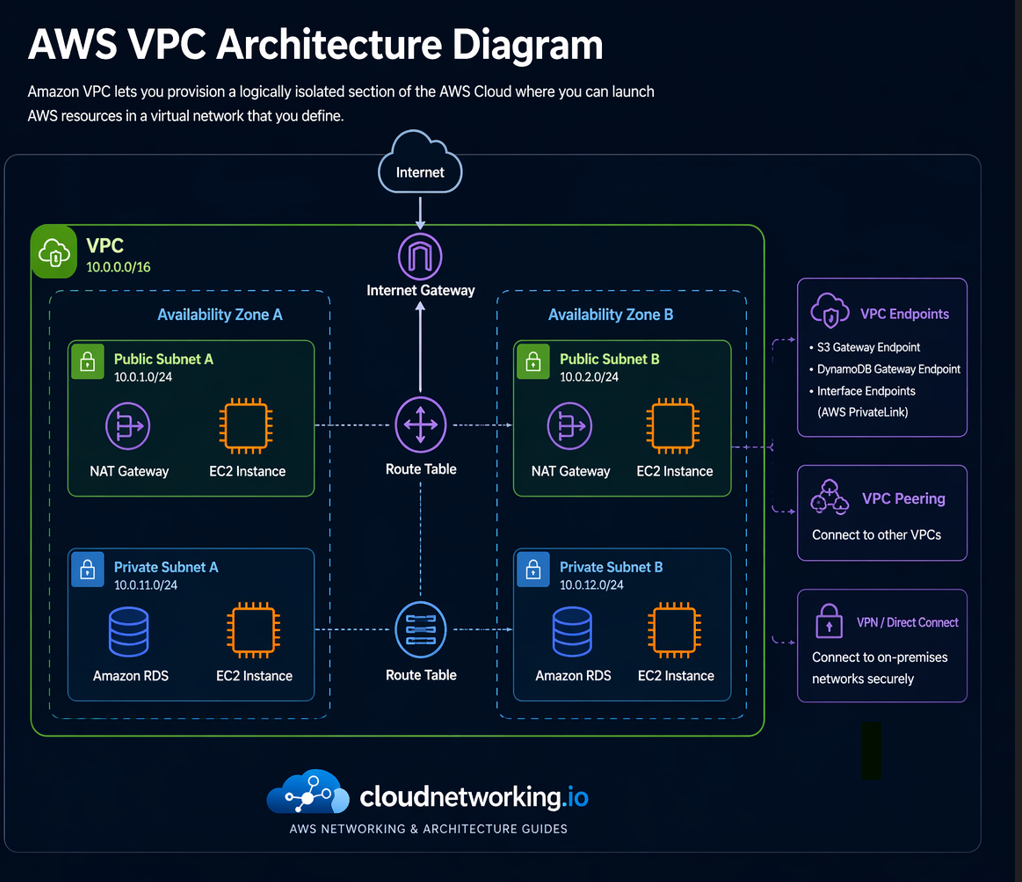
AWS VPC architecture diagram
The diagram below shows a clean VPC layout with public and private subnets across two Availability Zones, along with common connectivity options such as Internet Gateway, NAT Gateway, VPC Endpoints, VPC Peering, and VPN or Direct Connect style connectivity.
Real-life architecture example
Suppose you are hosting an e-commerce application in AWS:
- The public website receives traffic through a load balancer in a public subnet
- The application servers run in private subnets
- The database runs in a private subnet with no direct internet access
- Updates and package downloads from private servers go out through a NAT Gateway
This design improves security and follows a common AWS pattern. All of it is made possible because the VPC gives structure to the environment.
Best practices for beginners
- Do not make everything public just because it is easier
- Plan your IP ranges carefully from the beginning
- Use multiple Availability Zones for resilience
- Keep databases and internal services in private subnets
- Use clear naming for VPCs, subnets, and route tables
- Document your architecture for future growth
Frequently asked questions
What is a VPC in AWS?
A VPC is a logically isolated private network inside AWS where you define your IP range, subnets, routing, and traffic controls.
Why is a VPC important?
A VPC provides isolation, security boundaries, routing control, and structure for cloud workloads.
What should I learn after VPC?
After VPC, learn subnets, route tables, Internet Gateway, NAT Gateway, security groups, and network ACLs.
Can a VPC have both public and private subnets?
Yes. That is one of the most common AWS designs. Public subnets host entry-point resources, while private subnets host protected internal workloads.
Summary
AWS VPC is the private networking foundation of your AWS environment. It gives you structure, security, routing, isolation, and control. Once you understand VPC clearly, the rest of AWS networking becomes much easier: subnets, route tables, gateways, and security all build on top of this one concept.