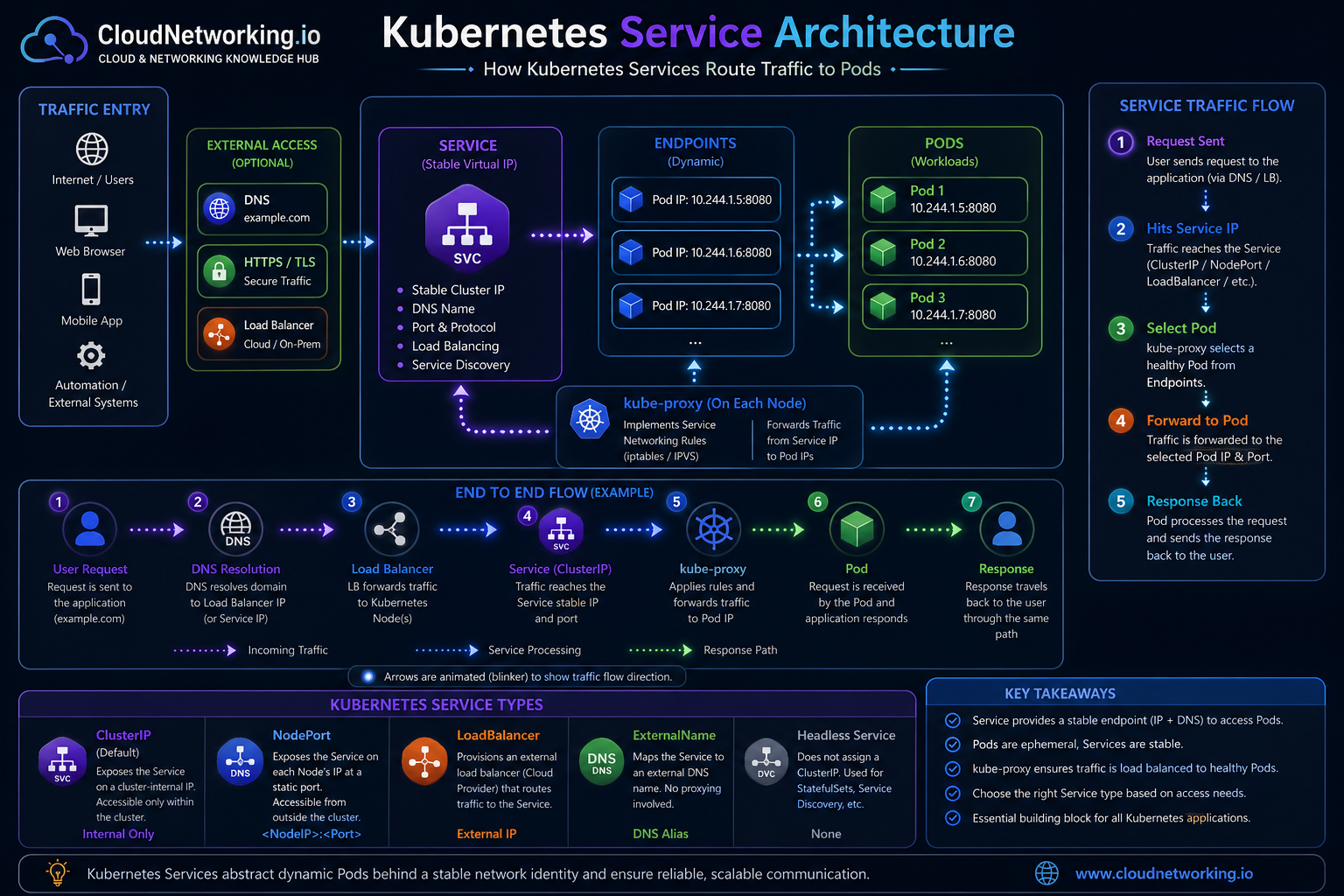
Kubernetes Service Architecture Diagram
The diagram below shows the most important concept: users or applications do not need to know the Pod IP. Traffic reaches the Service, the Service maps to Endpoints, and kube-proxy forwards traffic to healthy Pods.
CloudNetworking.io Kubernetes Service reference
Service route flow, Endpoints, Pods, kube-proxy, Service types, and troubleshooting-friendly architecture.
Simple Kubernetes Service to Pod Flow
This simple visual is useful for beginners: one Service sits in front of multiple Pods. The user or another application talks to the Service, and Kubernetes forwards the request to one of the matching Pods.

Client or application
The caller may be a browser, another microservice, a job, or an internal application. It sends traffic to the Service name or Service IP.
Service
The Service is the stable network identity. It has a stable ClusterIP and DNS name. It uses selectors to find matching Pods.
Selected Pods
What is a Kubernetes Service?
A Kubernetes Service is an abstraction that exposes a group of Pods through a stable network endpoint. Instead of calling a Pod directly, clients call the Service. Kubernetes then sends the traffic to one of the matching backend Pods.
Without a Service
An application must know the Pod IP. If the Pod restarts, scales, or moves, the IP may change and the connection can break.
With a Service
The application uses a stable Service name or IP. Kubernetes keeps the backend Pod list updated automatically.
Why do Kubernetes Services exist?
Services exist because Kubernetes workloads are dynamic. Deployments create and replace Pods. Autoscaling adds or removes Pods. Health checks may remove unhealthy Pods. A stable Service layer keeps communication reliable while Pods change behind the scenes.
Stable IP and DNS
A Service gets a stable virtual IP and DNS name inside the cluster.
Load balancing
Traffic can be distributed across matching backend Pods.
Service discovery
Applications can discover each other using Service names instead of Pod IPs.
Decoupling
The caller does not need to know which Pod is currently alive.
Scaling support
If Pods scale from 2 to 10, the Service continues to provide the same stable entry point.
Safer deployments
Rolling updates can replace Pods while the Service remains stable.
Kubernetes Service types explained
The Service type decides how the Service is exposed. Choosing the right type depends on whether traffic is internal, node-based, cloud load balancer based, DNS-based, or headless for direct Pod discovery.
| Service Type | Access Scope | Best Use Case | Example Scenario |
|---|---|---|---|
| ClusterIP | Internal cluster access only | Microservice-to-microservice communication | Frontend talks to backend API inside the cluster |
| NodePort | Exposes a port on every node | Labs, testing, simple external access | Access app using node IP and static port |
| LoadBalancer | External access through cloud or external load balancer | Public applications in managed Kubernetes | Expose web app in AKS, EKS, or GKE |
| ExternalName | DNS alias to external name | Point internal apps to external services | Map service name to external database DNS |
| Headless Service | No ClusterIP, direct endpoint discovery | StatefulSets, databases, service discovery | MongoDB, Cassandra, Kafka, custom discovery |
How Kubernetes Service traffic flows
This is the most important traffic path to understand. A request reaches the Service, kube-proxy applies the networking rules, and the request is forwarded to one of the backend Pod IPs from the Endpoints list.
Kubernetes Service YAML examples
These examples show common Service configurations. The key fields to understand are type,
selector, port, and targetPort.
ClusterIP Service
apiVersion: v1
kind: Service
metadata:
  name: backend-service
  namespace: default
spec:
  type: ClusterIP
  selector:
    app: backend
  ports:
    - name: http
      protocol: TCP
      port: 80
      targetPort: 8080
LoadBalancer Service
apiVersion: v1
kind: Service
metadata:
  name: web-service
  namespace: default
spec:
  type: LoadBalancer
  selector:
    app: web
  ports:
    - name: http
      protocol: TCP
      port: 80
      targetPort: 8080
port
The port exposed by the Service. Clients connect to this port.
targetPort
The port where the application is listening inside the Pod.
selector
The label match used to connect the Service to backend Pods.
selector does not match the Pod labels. In that case,
the Service exists but has no valid backend Endpoints.
Real-world Kubernetes Service scenarios
Below are common scenarios where Kubernetes Services are used in real environments.
Frontend to backend API
A frontend Pod calls http://backend-service. The backend Pods may scale or restart,
but the Service name remains the same.
Public web application
A LoadBalancer Service exposes the application externally. The cloud provider creates an external load balancer.
Internal database access
Internal applications connect to a database through a ClusterIP Service, keeping database access inside the cluster.
Stateful applications
Headless Services are useful when clients need to discover individual Pod identities, such as StatefulSet workloads.
Migration from external service
ExternalName can provide a Kubernetes Service name that maps to an external DNS name during migration.
Testing through NodePort
NodePort can expose a test application through a node IP and fixed port, but it is usually not the cleanest production pattern.
How to debug Kubernetes Service issues
Most Kubernetes Service problems are caused by selector mismatch, missing Endpoints, wrong targetPort, Pod readiness issues, DNS issues, NetworkPolicy blocks, or cloud LoadBalancer provisioning problems.
1. Check the Service
Confirm Service type, ClusterIP, ports, selector, and external IP if applicable.
kubectl get svc
kubectl describe svc backend-service
2. Check Endpoints
If Endpoints are empty, the Service is not connected to Pods.
kubectl get endpoints backend-service
kubectl get endpointslices
3. Check Pod labels
Make sure the Service selector matches actual Pod labels.
kubectl get pods --show-labels
kubectl get svc backend-service -o yaml
4. Check Pod readiness
Pods that are not Ready may not receive traffic.
kubectl get pods
kubectl describe pod <pod-name>
5. Test DNS from inside cluster
Run a temporary debug Pod and test Service name resolution.
kubectl run tmp-shell --rm -it \
  --image=busybox:1.36 -- sh

nslookup backend-service
wget -qO- http://backend-service
6. Check targetPort
Service targetPort must match the port your container listens on.
kubectl get deploy backend -o yaml
kubectl describe svc backend-service
Problem: Service has no Endpoints
Cause is usually selector mismatch or Pods not Ready. Check kubectl get pods --show-labels
and compare with spec.selector in the Service.
Problem: DNS works but app fails
DNS may resolve correctly, but the Pod may not be listening on the expected targetPort. Check container port, app logs, readiness probes, and Service targetPort.
Problem: LoadBalancer external IP pending
In cloud Kubernetes, this can mean the cloud controller cannot create a load balancer, permissions are missing, quota is reached, subnet tags are wrong, or the cluster is not integrated correctly.
Problem: Service unreachable across namespaces
Use the full DNS name: service-name.namespace.svc.cluster.local.
Also check NetworkPolicy, namespace, and Service name spelling.
Quick debugging checklist
- Does the Service exist in the expected namespace?
- Does the Service selector match Pod labels?
- Does the Service have Endpoints or EndpointSlices?
- Are the backend Pods Ready?
- Is
targetPortcorrect? - Can DNS resolve the Service name inside the cluster?
- Is NetworkPolicy blocking the traffic?
- For LoadBalancer, did the cloud provider create the external load balancer?
Common Kubernetes Service mistakes
Using Pod IPs directly
Pod IPs are temporary. Use Service DNS names for stable communication.
Selector mismatch
If selectors do not match labels, the Service has no backend Endpoints.
Wrong targetPort
The Service may point to a port where the application is not listening.
Confusing Service and Ingress
A Service exposes Pods. Ingress usually handles HTTP/HTTPS routing to Services.
Using NodePort everywhere
NodePort is useful for testing, but ClusterIP and Ingress/LoadBalancer are often cleaner.
Ignoring readiness
If Pods are not Ready, Service traffic may not reach them as expected.
Kubernetes Services video
Watch this video to reinforce how Kubernetes Services work and then use the diagrams and debugging sections above as a practical reference when working with real clusters.
Common Kubernetes Service interview questions
Why do we need Services?
Because Pods are dynamic and clients need a stable way to reach them.
What is the default Service type?
ClusterIP is the default Service type.
What does a selector do?
It matches the Service to Pods using labels.
What is the difference between port and targetPort?
port is exposed by the Service. targetPort is where the Pod application listens.
What is a Headless Service?
A Service with no ClusterIP, often used for direct Pod discovery and StatefulSets.
How do you debug a Service with no traffic?
Check Service, selectors, Endpoints, Pod readiness, targetPort, DNS, and NetworkPolicy.
Official Kubernetes references
Use these official references for deeper platform-specific details after understanding the concepts on this page.
Kubernetes Services
Official documentation for Kubernetes Service concepts and usage.
Open official docs →DNS for Services
Official documentation for how DNS works for Kubernetes Services and Pods.
Open DNS docs →Debug Services
Official guide for debugging Services, DNS, and networking behavior.
Open debugging docs →