Kubernetes Pod Architecture Diagram
This visual diagram highlights the Pod itself, the containers inside the Pod, shared namespaces, shared storage, lifecycle stages, Pod networking, and how the Pod runs on a worker node.
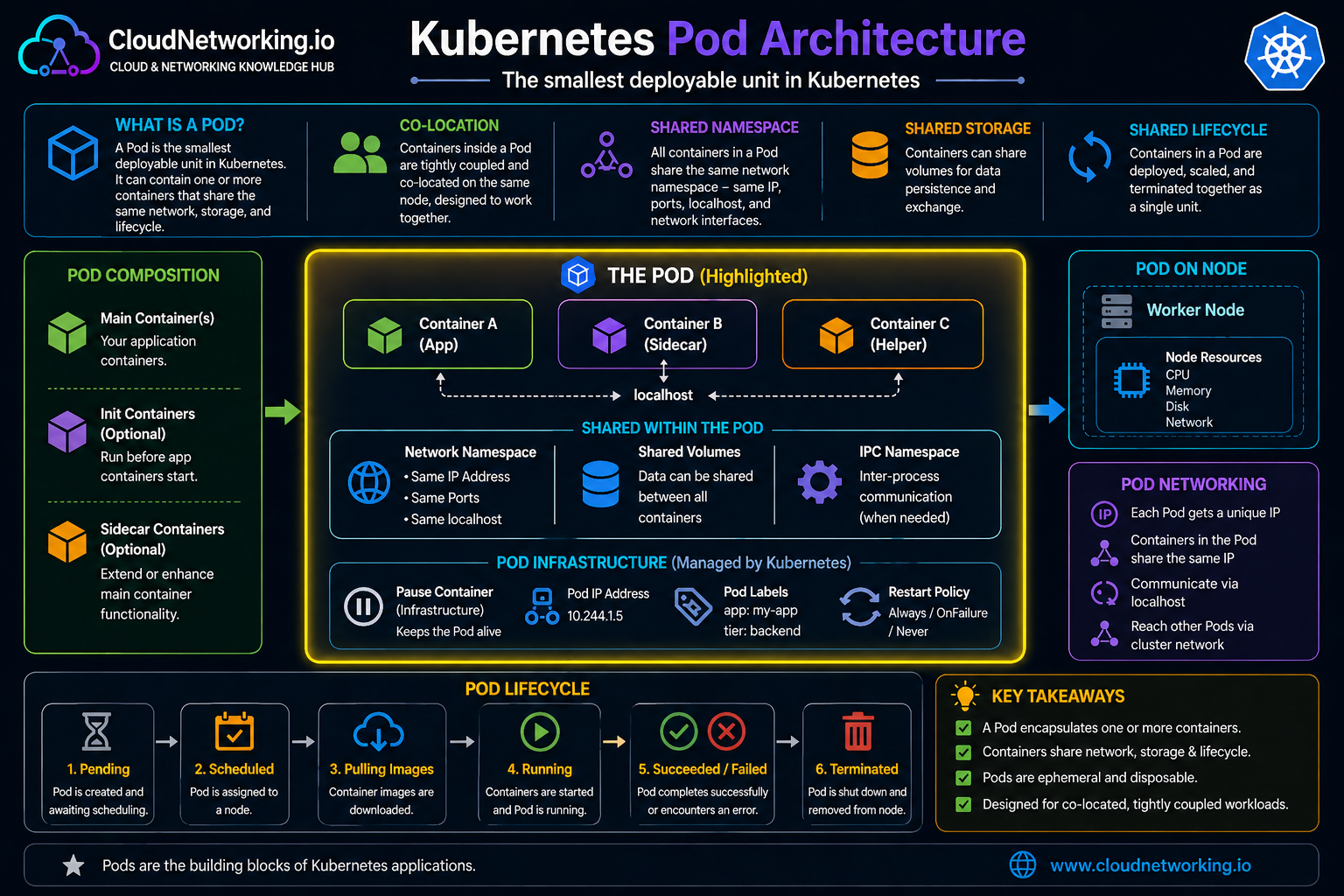
Quick summary
Before going deeper, here is the simple mental model for Pods and Pod networking.
What is a Pod?
A Pod is the basic unit that Kubernetes runs. In most real workloads, a Pod contains one main container, but technically it can contain one or more tightly related containers that need to run together.
All containers inside the same Pod share:
- the same network namespace
- the same IP address
- the same port space
- the ability to talk to each other using localhost
Easy way to picture it
Think of a Pod like a small apartment unit. The containers inside that apartment share the same internal address and can easily communicate with each other. But every apartment in the building has a different address from the outside.
Why do Pods matter in Kubernetes networking?
Pods matter because they are the starting point of all application communication inside the cluster. Services do not talk to containers directly. DNS does not point to containers directly. Traffic eventually lands on Pods.
That means Pods are important for:
- application-to-application communication
- service discovery
- load balancing
- Ingress traffic routing
- network security with policies
- troubleshooting cluster communication issues
Pod networking model
Kubernetes uses a simple but powerful networking model:
- every Pod gets its own unique IP address
- Pods can communicate directly with other Pods
- there is no NAT required between Pods
- Pods on different nodes should still be able to talk to each other
This is often called a flat networking model. Kubernetes expects the cluster network to make Pod-to-Pod communication work across the entire cluster, not just on the same node.
How Pods get IP addresses
Kubernetes itself does not directly assign Pod IPs. That job is typically handled by a CNI plugin, which stands for Container Network Interface.
The CNI plugin is responsible for:
- assigning an IP address to the Pod
- connecting the Pod to the cluster network
- making sure routing works between Pods on the same or different nodes
Different Kubernetes environments may use different CNIs, such as Calico, Cilium, Flannel, or cloud-specific options.
Practical idea
When a new Pod starts, the cluster needs to “plug it into” the network and give it an identity. The CNI plugin is what makes that happen.
How Pod-to-Pod communication works
Once Pods have IP addresses, they can communicate directly using those addresses. This is true whether the Pods are on the same worker node or different worker nodes, as long as the cluster networking is configured correctly.
Kubernetes expects:
- Pod A can reach Pod B by IP
- Pod B can reply back to Pod A
- traffic between Pods should not require address translation
Real-world example: frontend to backend to database
Imagine an online application running in Kubernetes:
- a frontend Pod serves the user interface
- a backend Pod handles login, orders, or API requests
- a database Pod or database endpoint stores application data
The traffic flow might look like this:
- user request reaches frontend
- frontend sends an internal request to backend
- backend connects to the database layer
What this teaches you
Even though users do not see Pods directly, the actual application communication path inside the cluster is built on Pod networking. Services, DNS, and Ingress simplify access, but Pods are still the real endpoints.
Pods, localhost, and shared networking inside the Pod
All containers inside the same Pod share the same network namespace. That means they can talk to each other using localhost.
This is why sidecar patterns work well. For example, a logging container or proxy container can run in the same Pod and communicate with the main application container over localhost.
Kubernetes Pod videos
These videos help users understand Pods, Pod lifecycle, and Kubernetes basics visually before going deeper into Services, Ingress, DNS, and CNI networking.
Common beginner mistakes
- thinking containers, not Pods, are the real networking endpoints
- assuming Pod IPs are stable forever
- trying to build app communication directly on changing Pod IPs instead of Services
- not understanding that Pods on different nodes should still communicate
- confusing Pod networking with Service load balancing
Common interview questions
- Do Pods get unique IP addresses? Yes.
- Can Pods communicate directly with each other? Yes, that is part of the Kubernetes networking model.
- Do containers inside the same Pod have separate IPs? No, they share the Pod IP.
- Do containers inside the same Pod communicate over localhost? Yes.
- Who usually assigns Pod IP addresses? The CNI plugin.
- Should applications depend directly on Pod IPs? Usually no; Services are better for stable access.
What this leads to next
Once you understand Pods, the next important topic is Services. Services solve the problem of unstable Pod identities by providing a stable way to reach workloads.
After that, the usual learning path is:
- Pods
- Services
- Cluster DNS
- CNI
- Ingress
- Network Policies
Next steps
Continue your Kubernetes networking path with the next core topics.