Azure Virtual Network (VNet)
The primary private networking service in Azure. VNets let you define IP ranges, isolate workloads, and connect Azure resources securely.
Read guide →
Azure networking is the foundation behind secure cloud communication, private application design, hybrid connectivity, global traffic delivery, and network visibility in Microsoft Azure. This hub brings together the main Azure networking services that engineers, architects, students, and DevOps teams use in real environments.
Start with core building blocks like Virtual Network, Subnets, NSG, and Route Tables, then move into private access, application delivery, hybrid networking, security controls, and troubleshooting tools.
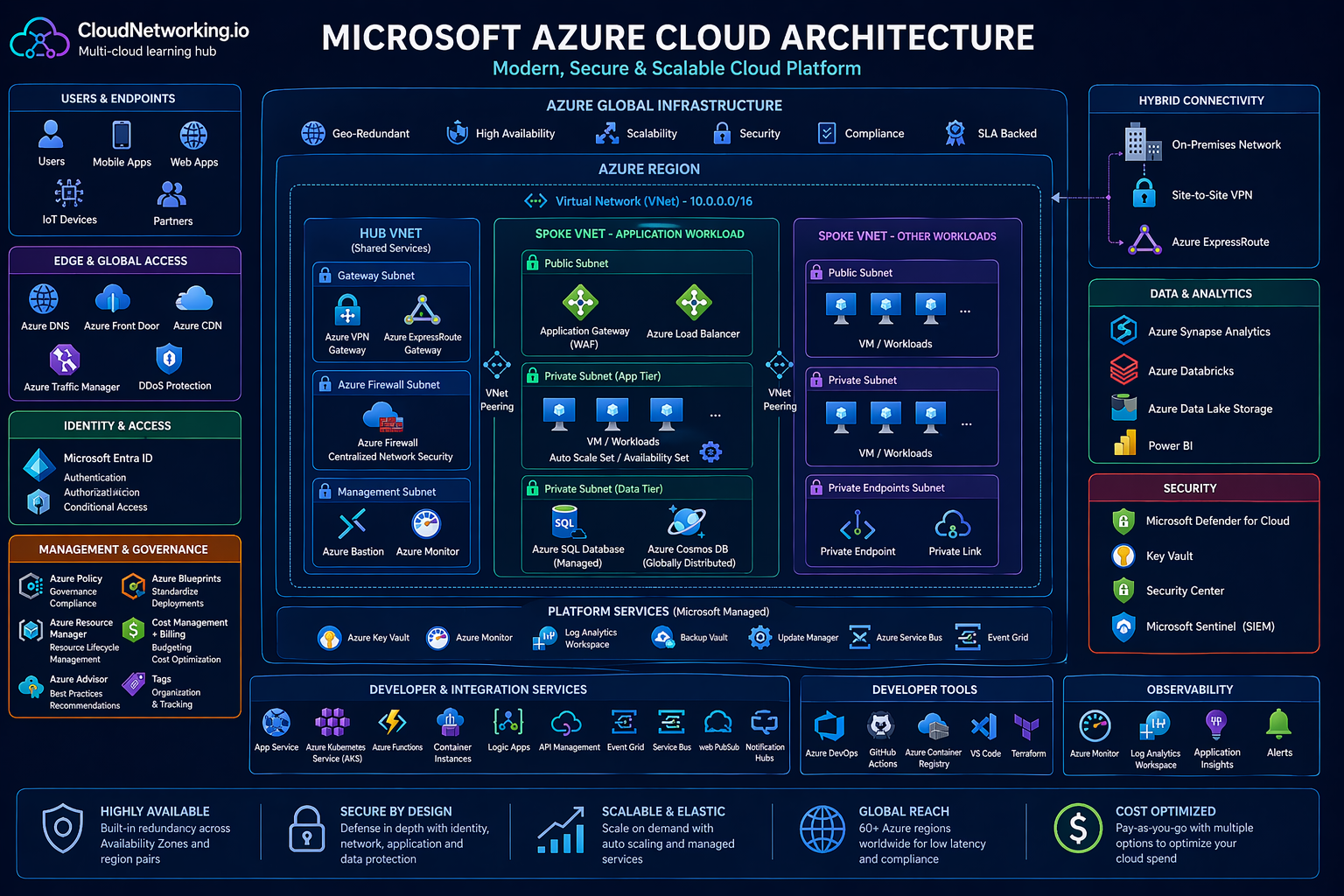
This visual reference helps users understand how Azure global infrastructure, VNets, hub-and-spoke design, platform services, security controls, hybrid connectivity, observability, and data services fit together in a modern Azure cloud architecture.
High-level Azure cloud architecture for learning, design thinking, and platform understanding.
These embedded videos help users understand Azure concepts visually before or after reading the detailed resource guides below.
A useful starting point for visitors who want a broader understanding of Azure before diving into networking services.
Helpful for connecting core platform services with the architecture diagram shown above.
A practical walkthrough for people specifically learning Azure networking concepts and resource relationships.
Useful for strengthening understanding of how Azure services are grouped and used in real environments.
A good supporting video for learners who want another perspective on Azure cloud design and operations.
Helpful as an additional video resource for users continuing from the architecture section into detailed learning.
Azure networking is not just about connecting resources. It is about controlling traffic flow, isolating workloads, reducing exposure, improving performance, building hybrid architectures, and supporting production-grade applications across regions and environments. Whether you are deploying a private application, publishing a web platform, connecting an on-premises datacenter, or troubleshooting routing issues, Azure networking services are central to the design.
These are the main Azure networking building blocks. They define address space, segmentation, routing, private connectivity, and foundational communication patterns inside Azure.
The primary private networking service in Azure. VNets let you define IP ranges, isolate workloads, and connect Azure resources securely.
Read guide →Subnets divide a VNet into smaller address ranges so workloads can be grouped by function, security, policy, or architecture requirements.
Read guide →NSGs control inbound and outbound traffic using rules based on source, destination, protocol, and port.
Read guide →User-defined routes help direct traffic to firewalls, appliances, VPN gateways, or specific network paths instead of default system routes.
Read guide →VNet peering privately connects virtual networks with high performance and low latency inside Azure.
Read guide →Private Link allows private access to supported Azure services and customer-owned services without exposing traffic to the public internet.
Read guide →Private Endpoints bring Azure PaaS services into your VNet using a private IP, improving isolation and compliance.
Read guide →NAT Gateway provides controlled outbound internet access for private resources without assigning public IPs directly to each workload.
Read guide →Azure DNS hosts public DNS zones in Azure and helps manage authoritative name resolution at cloud scale.
Read guide →These services handle traffic distribution, application publishing, global performance, and entry points for web-facing workloads.
A high-performance Layer 4 service that distributes TCP and UDP traffic across backend instances.
Read guide →A Layer 7 load balancer for HTTP and HTTPS traffic with routing, SSL termination, and optional web application firewall features.
Read guide →Azure Front Door is used for global application acceleration, edge routing, and secure entry for distributed web applications.
Read guide →Traffic Manager routes users to endpoints based on DNS methods such as priority, weighted, performance, or geographic routing.
Read guide →Hybrid networking services connect Azure to branch offices, datacenters, remote users, and enterprise WAN architectures.
VPN Gateway enables encrypted connectivity between Azure and on-premises environments or remote users across the internet.
Read guide →ExpressRoute provides private dedicated connectivity into Azure for enterprises that need lower latency, privacy, and predictable performance.
Read guide →Virtual WAN centralizes branch, remote user, VPN, and ExpressRoute connectivity for large-scale enterprise network design.
Read guide →These Azure services help protect workloads, filter traffic, reduce exposure, and provide safer administrative access models.
Azure Firewall is a managed network security service for central traffic inspection, filtering, and policy enforcement.
Read guide →DDoS Protection helps defend public-facing Azure resources from volumetric and protocol attacks.
Read guide →Azure Bastion provides browser-based secure access to virtual machines without exposing public IP addresses on the VMs.
Read guide →Visibility matters in cloud networking. These services help inspect paths, validate communication, monitor health, and understand traffic behavior.
Network Watcher gives operational visibility into Azure network resources and supports troubleshooting workflows.
Read guide →Connection Monitor tracks reachability and performance between endpoints so engineers can detect network issues early.
Read guide →NSG Flow Logs help analyze allowed and denied traffic patterns for troubleshooting, auditing, and security visibility.
Read guide →Every Azure networking resource page on CloudNetworking.io should include an official Microsoft documentation section so readers can validate concepts, compare platform terminology, and go deeper when needed.