Kubernetes CNI architecture diagram
This diagram shows how Kubernetes uses the CNI plugin during Pod creation. The animated arrows highlight the traffic and setup flow from the control plane to the node, kubelet, CNI plugin, Pod interface, and underlying node network.
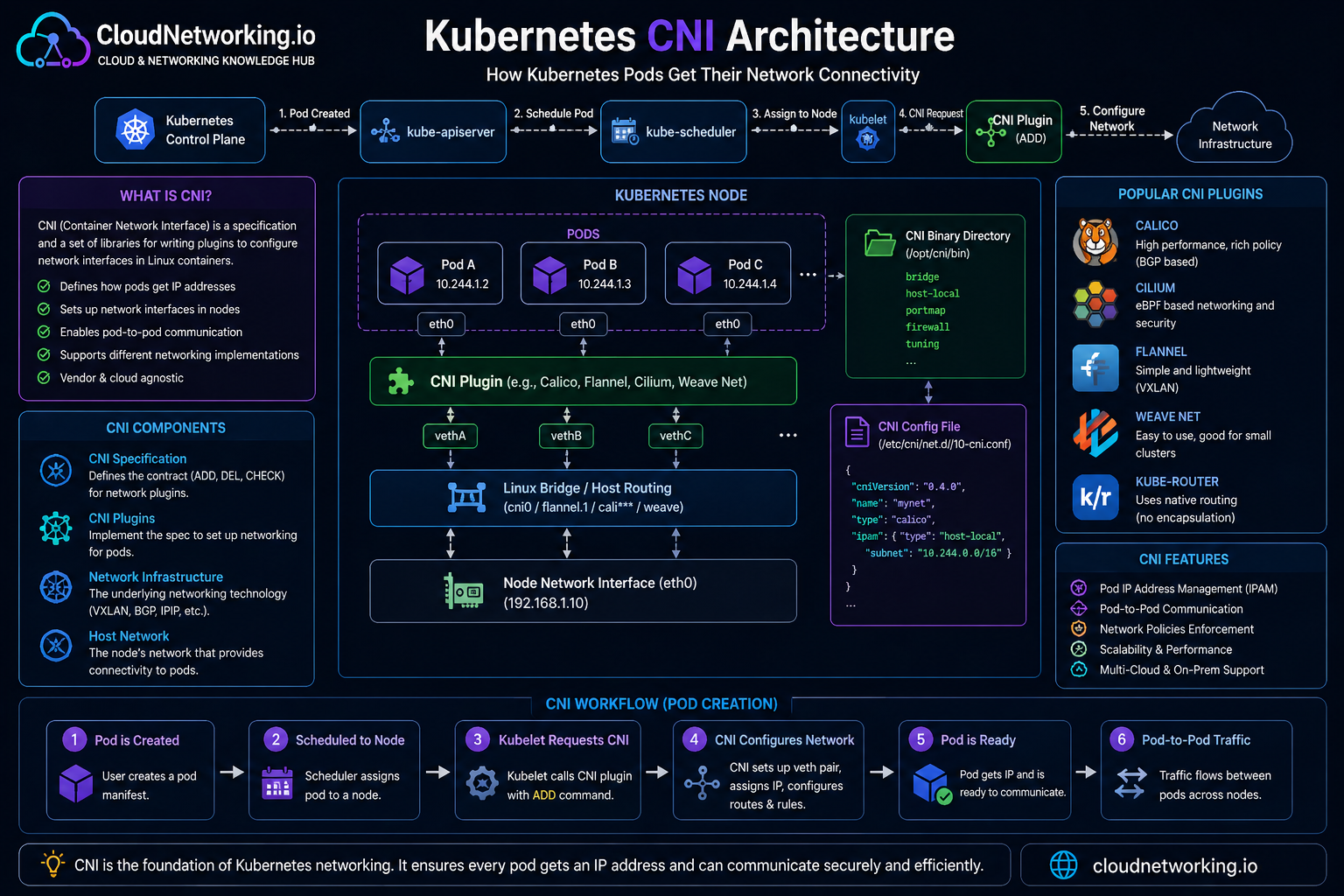
Quick summary
Before going deeper, here is the simplest way to think about CNI.
What
CNI is the standard interface used to configure container networking.
Why
Kubernetes needs a CNI plugin to implement the pod network model.
What it does
It connects Pods to the network, assigns addresses, and cleans up when Pods go away.
Why CNI exists
Kubernetes expects a cluster network where Pods can get IP addresses and communicate across nodes. But Kubernetes does not hardcode one single network implementation for everyone.
Instead, Kubernetes relies on CNI-compatible plugins to implement that network model in a flexible way.
Why this matters
A cloud provider, an on-prem cluster, and an edge cluster may all need different networking designs. CNI lets Kubernetes stay portable while still supporting different network implementations.
What is CNI?
CNI stands for Container Network Interface. It is a specification and set of libraries for configuring network interfaces for containers. In Kubernetes, a CNI plugin connects Pods to the cluster network.
In practical Kubernetes terms:
- a CNI plugin is required to implement the Kubernetes network model
- the runtime on each node loads and uses the plugin
- the plugin wires Pods into the cluster network
How CNI works in plain language
When a Pod starts, Kubernetes and the container runtime need to do more than launch a container process. They also need to connect that Pod to the network.
The exact implementation varies by plugin, but the idea stays the same: CNI turns a new Pod from “just a container” into a workload that can actually communicate.
How a Pod gets an IP address
One of the most important jobs of a CNI plugin is to give each Pod network connectivity and an address that fits the cluster’s pod networking design.
A simplified flow looks like this:
Overlay networking vs native routing
One of the biggest architecture differences between CNI plugins is how they move traffic between nodes. This is where terms like overlay and native routing come in.
Overlay networking
Pod traffic is encapsulated across the underlying network. This can simplify cross-node networking because the overlay creates a virtual pod network on top of the existing network.
Native routing
Pod traffic is routed more directly using the underlying network design. This can reduce encapsulation overhead, but may require tighter integration with the cloud or physical network.
Easy analogy
Overlay is like shipping your traffic in wrapped packages through an existing road system. Native routing is more like giving the road system direct knowledge of the real destinations.
Popular CNI plugin choices
Different CNI plugins make different tradeoffs. Kubernetes does not force one plugin for all clusters.
Calico
Known for routing flexibility and strong NetworkPolicy support.
Cilium
Known for advanced data-plane features and strong policy/observability capabilities.
Flannel
Often used for simpler pod networking setups, especially in learning environments.
There are also other plugin options across the ecosystem, and managed Kubernetes offerings often wrap or customize the networking layer for their platform.
CNI vs kube-proxy
Beginners often confuse these two, so it helps to separate them clearly.
CNI
Handles pod network connectivity and how Pods join the network.
kube-proxy
Implements Service traffic behavior for many Kubernetes setups.
Important nuance
Some pod network implementations provide tighter service handling and do not rely on kube-proxy the same way.
CNI and Network Policies
Network Policies only work if the network plugin supports enforcement. This is one of the strongest reasons CNI choice matters beyond simple connectivity.
In other words:
Real-world example: e-commerce app on Kubernetes
Imagine an application with:
- frontend Pods
- backend Pods
- database Pods
The CNI plugin helps make this possible:
- frontend Pods get IPs and join the cluster network
- backend Pods get IPs and can be reached through Services
- database Pods get internal connectivity but can be restricted by policy
- cross-node communication works because the plugin provides the required pod network behavior
Why this matters
When users say “Kubernetes networking works,” a big part of what they mean is that the chosen CNI implementation is successfully wiring all these Pod paths together.
Why CNI is one of the most important Kubernetes topics
CNI sits underneath many other Kubernetes networking concepts:
- Pods depend on it for IP and connectivity
- Services depend on a functioning pod network underneath
- Ingress depends on Services and pod reachability
- Network Policies depend on enforcement support from the network layer
Common beginner mistakes
- thinking CNI is a single product rather than a standard interface plus many plugin choices
- assuming all plugins behave the same way
- not understanding why Pod IP behavior can vary between platforms
- confusing pod connectivity with Service routing
- forgetting that policy enforcement depends on the network implementation
Common interview questions
- What is CNI in Kubernetes? A standard interface used by network plugins to implement container and Pod networking.
- Why does Kubernetes need CNI? Because Kubernetes requires a network implementation for the pod network model but does not hardcode one single solution.
- What does a CNI plugin do? It provides Pod network connectivity, IP allocation/configuration, and cleanup when the Pod is removed.
- What is the difference between overlay and native routing? Overlay adds a virtual network layer on top of the underlying network, while native routing uses the underlying network more directly.
- Can CNI choice affect NetworkPolicy support? Yes.
- Is kube-proxy the same as CNI? No.
How CNI fits into the Kubernetes learning path
A clean networking path now looks like this:
- Pods are the workloads
- CNI gets those Pods onto the network
- Services provide stable access to Pods
- DNS gives names to Services
- Ingress brings external web traffic in
- Network Policies restrict which traffic is allowed