AWS Subnets Explained
AWS Subnets are one of the most important building blocks in VPC design. A subnet is a smaller network segment inside a VPC that helps you organise resources, separate traffic patterns, and control routing and security design more effectively.
In real AWS environments, subnet planning affects almost everything: public versus private architecture, internet access, NAT Gateway placement, Availability Zone resilience, IP usage, and long-term scalability.
What is an AWS subnet?
An AWS subnet is a smaller IP network range carved out from a larger VPC CIDR block. It helps divide the VPC into logical sections so that different resources can be grouped, routed, and secured more effectively.
Instead of placing every resource into one flat network, subnets allow you to separate different types of workloads such as load balancers, application servers, databases, bastion hosts, and internal services.
Main private network boundary
Smaller logical network segments
Traffic behavior depends on route design
Why subnets matter in AWS
Good subnet design makes AWS networking easier to manage, scale, and secure. Poor subnet design creates long-term pain around IP exhaustion, routing confusion, and inconsistent architecture patterns.
Traffic separation
Public-facing and internal workloads can be placed in different network segments.
Security design
Subnets help reinforce architectural boundaries between front-end, app, and database layers.
Availability Zone planning
Subnets are tied to Availability Zones, so they are central to resilient multi-AZ architecture.
Scalability
Proper CIDR planning avoids running out of IP addresses as workloads grow.
Public vs private subnets
One of the most important subnet concepts in AWS is the difference between public and private subnets. The subnet itself is not “public” or “private” because of its name. It becomes public or private based on its routing behaviour.
Public Subnet
A public subnet usually has a route to an Internet Gateway (IGW). It is commonly used for internet-facing components such as load balancers, bastion hosts, or public-facing proxies.
Private Subnet
A private subnet does not have a direct route to the Internet Gateway. It is commonly used for application servers, internal services, and databases that should not be directly reachable from the internet.
Typical placement
- Public subnets: ALB, bastion host, public reverse proxy
- Private subnets: application servers, internal APIs, databases, worker nodes
CIDR basics for subnets
Each subnet uses a CIDR range that comes from the parent VPC CIDR block. CIDR determines how many IP addresses are available inside the subnet.
VPC CIDR:       10.0.0.0/16
Public Subnet:  10.0.1.0/24
Private Subnet: 10.0.2.0/24
DB Subnet:      10.0.3.0/24
Why CIDR matters
- It defines subnet size and IP capacity.
- It affects future expansion ability.
- It determines whether you can add more resources later without redesigning the VPC.
| CIDR Block | Total IPs | Typical Use |
|---|---|---|
| /24 | 256 | Common subnet size for medium environments |
| /25 | 128 | Smaller subnet where IP use is controlled |
| /26 | 64 | Smaller utility or edge subnet |
| /27 | 32 | Very small subnet, often risky for future growth |
Subnet sizing strategy
One of the most common AWS networking mistakes is creating subnets that are too small. Even when the current number of instances is low, subnets should be sized with growth, scaling events, and managed service needs in mind.
Things to consider when sizing
- Auto scaling growth
- Container and node scaling
- Load balancer and managed service attachments
- Future environment expansion
- AWS reserved IP addresses in every subnet
AWS reserved IP addresses in each subnet
AWS reserves five IP addresses in every subnet. This is a very important detail that many people forget during subnet design and interview discussions.
Why this matters
- Your usable IP count is always lower than the total subnet size.
- Very small subnets can become unusable faster than expected.
- This is especially important in tightly sized non-prod or test environments.
Example: /24 subnet
Total IPs: 256
AWS reserved: 5
Usable IPs: 251Availability Zone based subnet design
Subnets are tied to a single Availability Zone. This means a subnet does not span across multiple AZs. If you want a resilient design, you create separate subnets in multiple AZs.
Example multi-AZ layout
VPC: 10.0.0.0/16

AZ-a
  Public Subnet:  10.0.1.0/24
  Private Subnet: 10.0.11.0/24

AZ-b
  Public Subnet:  10.0.2.0/24
  Private Subnet: 10.0.12.0/24
This kind of design is common for load balancers, highly available application tiers, and resilient backend services.
Route tables, Internet Gateway, and NAT Gateway relationship
Subnets do not decide traffic behaviour on their own. Route tables attached to the subnet determine where traffic goes.
Route Table
Controls where outbound subnet traffic is sent.
Internet Gateway
Enables public internet routing for public subnet designs.
NAT Gateway
Allows private subnets to reach the internet outbound without exposing them inbound.
Typical routing pattern
Public Subnet Route Table
0.0.0.0/0 ---> Internet Gateway

Private Subnet Route Table
0.0.0.0/0 ---> NAT Gateway
This is why subnet design and route table design always go together. A subnet without understanding its route table is only half the story.
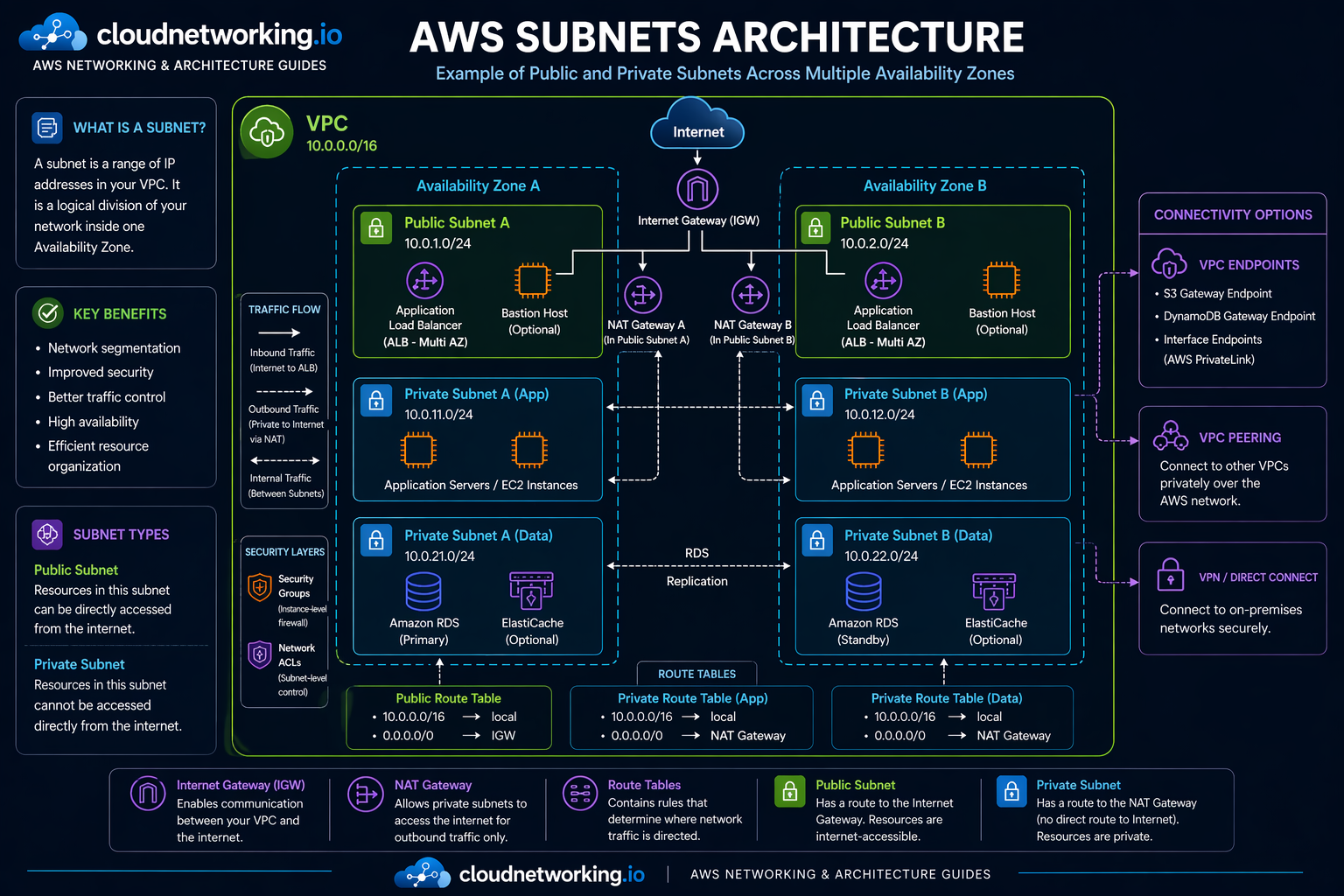
AWS subnets architecture diagram
The diagram below shows a practical AWS subnet design across multiple Availability Zones, with public and private subnets, NAT Gateways placed in public subnets, multi-AZ load balancer behavior, app and data tiers, route tables, and common connectivity options.
Real-world subnet architectures
Two-tier architecture
Internet
   |
   v
Public Subnet ---> ALB / Bastion
   |
   v
Private Subnet ---> Application servers
Three-tier architecture
Internet
   |
   v
Public Subnet ---> ALB
   |
   v
Private App Subnet ---> Application servers
   |
   v
Private DB Subnet ---> Database
These patterns are common because they separate internet-facing traffic from internal application and database layers.
Terraform example for AWS subnets
Below is a simple example creating one public and one private subnet inside a VPC.
resource "aws_subnet" "public" {
  vpc_id                  = "vpc-12345678"
  cidr_block              = "10.0.1.0/24"
  availability_zone       = "af-south-1a"
  map_public_ip_on_launch = true

  tags = {
    Name = "public-subnet-a"
  }
}

resource "aws_subnet" "private" {
  vpc_id            = "vpc-12345678"
  cidr_block        = "10.0.11.0/24"
  availability_zone = "af-south-1a"

  tags = {
    Name = "private-subnet-a"
  }
}
What this Terraform does
- Creates one public subnet with automatic public IP assignment.
- Creates one private subnet for internal workloads.
- Places both in the same Availability Zone for this example.
Common subnet mistakes
Making subnets too small
Small subnets may seem fine initially but become limiting when workloads scale or new services are added.
Confusing public IPs with public subnets
A subnet is public because of routing to an Internet Gateway, not just because something inside it has a public IP.
Poor AZ planning
Creating everything in one AZ defeats much of AWS’s resilience model.
Mixing unrelated workloads
Putting front-end, app, and database resources into one subnet usually creates security and operational confusion.
Ignoring route table dependencies
Many subnet issues are actually route table issues. Always review both together.
Subnet troubleshooting guide
Problem: Instance cannot reach internet
Check whether the subnet route table has the correct path to IGW or NAT Gateway.
Problem: Private subnet acting like public
Check route table associations and whether it has a direct route to the Internet Gateway.
Problem: No available IPs
Check subnet size, current resource count, and whether AWS reserved addresses were considered.
Problem: Multi-AZ design still not resilient
Check whether subnets, route tables, and resources are actually distributed across multiple AZs.
Practical checklist
- Check subnet CIDR and available IP count.
- Confirm route table association.
- Validate IGW or NAT route configuration.
- Verify the subnet’s Availability Zone placement.
- Review whether the subnet is really intended to be public or private.
Subnet interview questions
It is a smaller IP range inside a VPC used to logically segment network resources and control routing and placement.
A public subnet usually has a route to an Internet Gateway, while a private subnet does not and often uses a NAT Gateway for outbound internet access.
AWS reserves five IP addresses in every subnet.
No. A subnet belongs to a single Availability Zone.
Because poor sizing can lead to IP exhaustion, scaling problems, and difficult redesign later.
Frequently asked questions
AWS subnets are used to divide a VPC into smaller network segments for routing, security, placement, and architecture design.
Yes, usually through a NAT Gateway for outbound traffic, but they do not have direct inbound internet exposure like public subnet designs.
Check the route table. If it has a route to an Internet Gateway for internet-bound traffic, it is part of a public subnet design.