AWS Route Tables explained in simple terms
In AWS, route tables decide where network traffic should go. They are one of the most important parts of VPC design because they control whether traffic stays local, goes to the internet, or reaches private destinations such as NAT gateways, peering connections, VPNs, transit gateways, and endpoints.
This guide explains AWS route tables with practical examples, simple language, route priority behavior, and a structured beginner-friendly approach that also works well for DevOps and interview preparation.
What is an AWS route table?
A route table is a collection of routes inside a VPC. Each route contains a destination and a target. Together, those routes tell AWS where traffic from a subnet or gateway should be directed.
Every subnet in a VPC must be associated with exactly one route table. Multiple subnets can share the same route table, but any single subnet can only use one route table at a time.
The CIDR block or prefix list to match
The next hop such as local, IGW, NAT, TGW, or VPN
The subnet that uses the route table
Why route tables matter
Route tables are critical because security groups and network ACLs do not decide where packets go. They only allow or deny traffic. Route tables decide the actual traffic path.
Internet access
Route tables determine whether a subnet can reach the internet through an Internet Gateway or only through a NAT Gateway.
Private connectivity
Route tables control traffic to VPNs, Direct Connect, VPC peering, transit gateways, and endpoints.
Subnet behavior
A subnet’s route table is a major reason it behaves as public, private, isolated, or hybrid-connected.
Troubleshooting
Many AWS connectivity problems are really route table issues, even when people first suspect firewalls.
Main route table vs custom route tables
When you create a VPC, AWS automatically creates a main route table for it. If a subnet is not explicitly associated with a custom route table, it uses the main route table by default.
Main route table
This exists automatically. In a nondefault VPC, it typically starts with only the local route. New subnets use it unless you explicitly associate them with another route table.
Custom route tables
These are created by you to provide more precise routing control. They are commonly used to separate public and private subnet behavior.
How routing works in AWS
Each route contains a destination and a target. AWS compares the packet’s destination IP against the available routes and selects the correct next hop.
Example route table

Destination       Target
10.0.0.0/16       local
0.0.0.0/0         igw-123456
In the example above, traffic staying within the VPC uses the local route, while all other IPv4 traffic uses the Internet Gateway.
Default local route
Every route table contains a local route for the VPC CIDR. If the VPC has multiple IPv4 CIDR blocks or an IPv6 block, the route table contains a local route for each one.
Longest prefix match and route priority
AWS uses the most specific matching route to decide how to route traffic. This is called longest prefix match.
Destination         Target
10.0.0.0/16         local
10.0.10.0/24        pcx-abc123
0.0.0.0/0           igw-xyz789
If traffic is going to 10.0.10.25, AWS uses 10.0.10.0/24 because it is more specific than 10.0.0.0/16.
If traffic is going to 8.8.8.8, AWS uses 0.0.0.0/0.
Public vs private subnet routing
Public subnet route pattern
Destination       Target
10.0.0.0/16       local
0.0.0.0/0         igw-123456
A public subnet usually has a default route to an Internet Gateway. This allows internet-bound traffic to leave the VPC directly.
Private subnet route pattern
Destination       Target
10.0.0.0/16       local
0.0.0.0/0         nat-123456
A private subnet typically has no direct route to the Internet Gateway. Instead, outbound internet traffic is sent to a NAT Gateway placed in a public subnet.
Public subnet use cases
Application Load Balancer, bastion host, reverse proxy, internet-facing endpoints.
Private subnet use cases
Application servers, worker nodes, internal APIs, databases, internal services.
Common route targets in AWS
| Target | Purpose | Typical use case |
|---|---|---|
| local | Routing within the VPC | Subnet-to-subnet traffic inside the same VPC |
| Internet Gateway | Direct internet routing | Public subnets |
| NAT Gateway | Outbound internet for private subnets | Patch downloads, package installs, API access |
| VPC Peering | Private VPC-to-VPC traffic | Two VPCs needing direct communication |
| Transit Gateway | Centralized hub routing | Multi-VPC and hybrid environments |
| Virtual Private Gateway / VPN | Private connectivity to on-premises | Hybrid networking |
| VPC Endpoints | Private AWS service access | S3 or DynamoDB without internet routing |
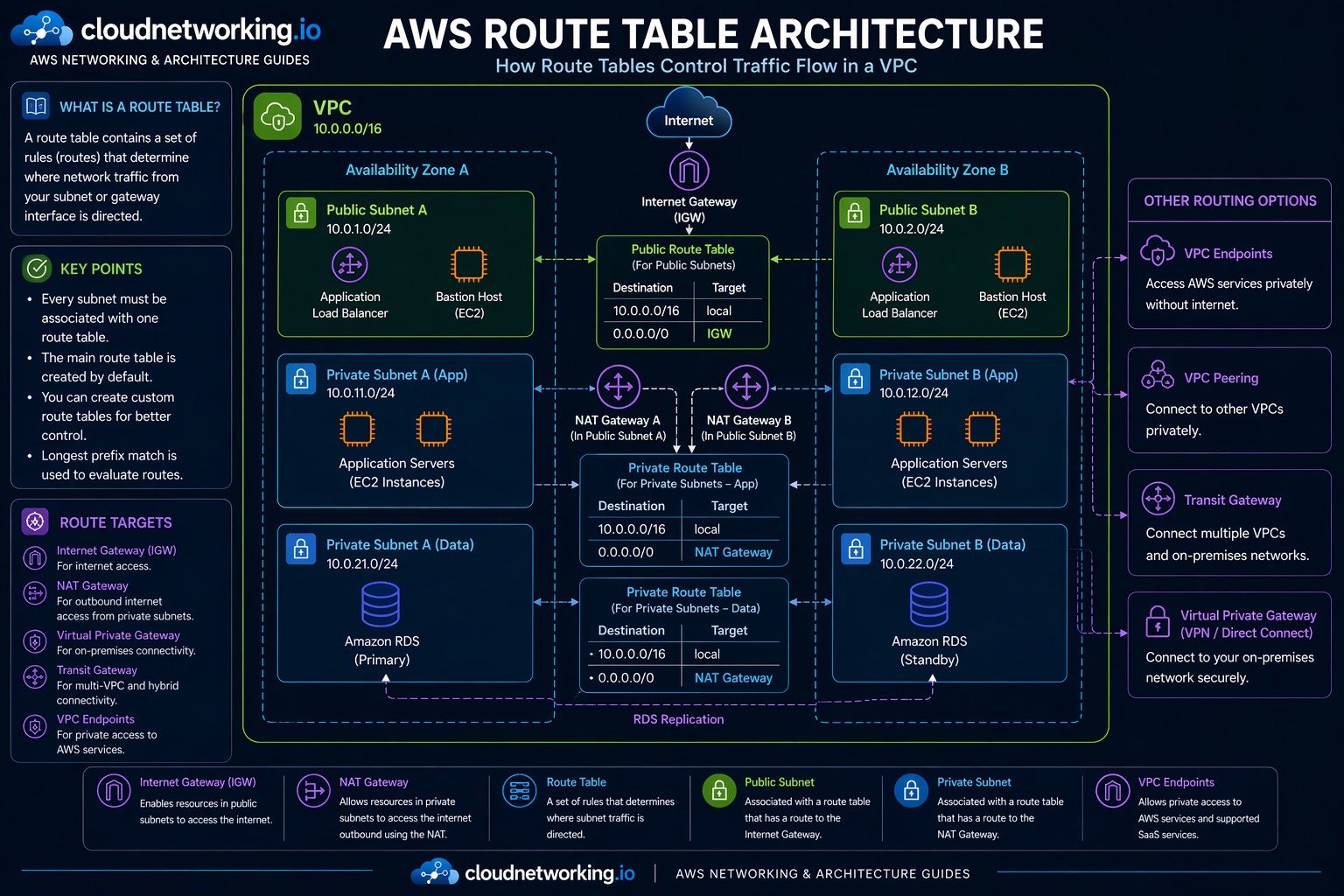
AWS Route Tables architecture diagram
The diagram below shows how route tables control traffic flow inside a VPC across public and private subnets, using local routes, Internet Gateway routing, NAT Gateway routing, and optional private connectivity patterns.
Real-world route table examples
Example 1: Public web application
A load balancer sits in public subnets. The public route table sends internet-bound traffic to the Internet Gateway so users can reach the application.
Example 2: Private application servers
Application servers in private subnets need outbound access for updates and dependency downloads. Their route table sends default traffic to the NAT Gateway instead of the Internet Gateway.
Example 3: Hybrid enterprise network
Internal application traffic to on-premises systems may be routed to a VPN or transit gateway target through a more specific private route.
Best practices
Separate route intent clearly
Use different route tables for public and private subnet groups instead of mixing conflicting purposes.
Name them clearly
Use names like rt-public-a, rt-private-app-a, rt-private-db-a for readability and operations.
Document associations
Subnet-to-route-table associations should be visible in architecture docs and Terraform naming.
Test before making main-route changes
Use a custom route table for testing before replacing the main route table behavior.
Common mistakes
- Assuming security groups alone control internet reachability
- Calling a subnet public without checking its route table
- Forgetting NAT Gateway routing for private subnet outbound traffic
- Using the main route table for too many conflicting subnet patterns
- Ignoring longest prefix match when overlapping routes exist
- Changing main-route behavior without validating existing subnet associations
Troubleshooting checklist
Cannot reach internet from public subnet
Check whether the subnet’s route table has a default route to the Internet Gateway and whether the resource has the correct public exposure settings.
Private subnet has no outbound access
Check whether the route table sends default traffic to a NAT Gateway and whether that NAT Gateway is placed in a public subnet.
Traffic taking the wrong path
Review overlapping routes and apply longest prefix match reasoning to see which route is really winning.
Unexpected subnet behavior
Verify which route table the subnet is explicitly or implicitly associated with.
Fast route-table checks
- Which route table is the subnet associated with?
- Does the route table have the expected local and default routes?
- Is the target attached and healthy, such as IGW or NAT?
- Are there overlapping routes with more specific prefixes?
- Are you debugging a routing issue that is actually a security group or NACL issue afterward?
Frequently asked questions
It is a set of routes that determines where network traffic from a subnet or gateway is directed inside a VPC.
Yes. Every subnet must be associated with a route table, either explicitly or implicitly through the main route table.
A public subnet has a route table with a default route to an Internet Gateway.
A private subnet does not have direct routing to an Internet Gateway. It often uses a NAT Gateway for outbound access.
AWS uses longest prefix match, which means the most specific route wins.