AWS Internet Gateway explained clearly
An Internet Gateway, often called IGW, is the AWS VPC component that allows communication between your VPC and the public internet. It is a core building block behind public subnet design, internet-facing load balancers, bastion access patterns, and direct inbound or outbound internet connectivity.
This guide explains what an Internet Gateway is, why it matters, how it works with route tables and public IP addresses, how it differs from NAT Gateway, and how to design around it in practical AWS architectures.
What is an Internet Gateway in AWS?
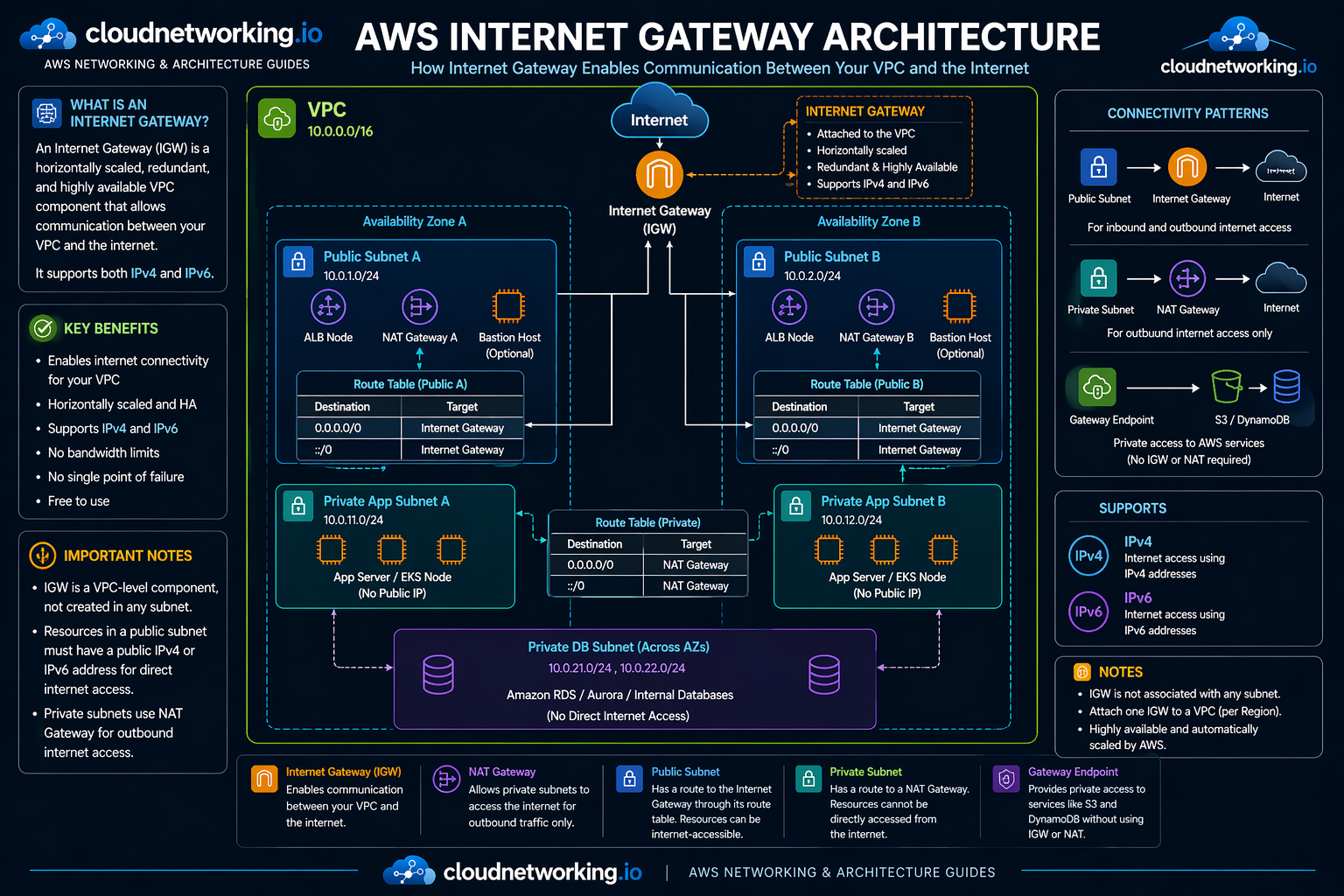
An Internet Gateway is a VPC-level component that allows communication between your VPC and the internet. It is not created inside a subnet, and it is not tied to a single Availability Zone. Instead, it attaches to the VPC itself and acts as the route target for internet-routable traffic.
In AWS terms, the Internet Gateway is horizontally scaled, redundant, highly available, and supports both IPv4 and IPv6 traffic. It is also the component that enables direct public internet access patterns when the rest of the network design is configured correctly.
IGW attaches to the VPC, not to a subnet
Horizontally scaled, redundant, and highly available
Supports both address families for internet communication
Why Internet Gateway matters
Internet Gateway is central to public AWS networking because it is the component that turns a VPC into an environment that can communicate with the public internet when routing and IP settings allow it.
Inbound internet access
Users on the internet can reach internet-facing resources in public subnet designs through the Internet Gateway, as long as the resource has the required public addressability and security rules.
Outbound internet access
Resources in public subnet designs can reach the internet directly through IGW when they have public IPv4 or IPv6 addressing configured properly.
Public subnet architecture
Subnets are considered public when their route table sends internet-bound traffic to the Internet Gateway.
Base networking concept
Without understanding Internet Gateway, it is hard to understand public subnets, route tables, Elastic IPs, and IGW vs NAT behavior correctly.
How Internet Gateway works
For Internet Gateway communication to work, several pieces must line up:
- The VPC must have an Internet Gateway attached.
- The subnet route table must send internet-bound traffic to that IGW.
- The resource must have a public IPv4 address or an IPv6 address for direct internet connectivity.
- Security groups and network ACLs must allow the traffic pattern.
Simple sequence
1. Create or use a VPC
2. Attach an Internet Gateway to the VPC
3. Add route table entry:
   0.0.0.0/0 --> igw-id
   ::/0      --> igw-id
4. Associate that route table with the subnet
5. Give the resource a public IPv4 or IPv6 address
6. Allow traffic in security groups / NACLs
If one of these steps is missing, internet connectivity may fail even though the Internet Gateway itself exists.
How a subnet becomes public
One of the most important AWS networking ideas is that a subnet is considered public when its route table has a route to an Internet Gateway. The subnet is not public just because you named it “public,” and not just because something inside it has a public IP.
| Subnet type | Route table pattern | Typical use |
|---|---|---|
| Public subnet | 0.0.0.0/0 → Internet Gateway ::/0 → Internet Gateway |
ALB, bastion host, public proxy, internet-facing entry layer |
| Private subnet | No direct route to Internet Gateway | App tier, internal services, databases |
Why public IP or IPv6 still matters
Internet Gateway alone does not make a resource reachable. For direct internet communication over IPv4, the resource must have a public IPv4 address or an Elastic IP. For IPv6, the VPC and subnet must have IPv6 CIDR allocation, and the resource must have an IPv6 address.
IPv4 pattern
Resource in public subnet + route to IGW + public IPv4 or Elastic IP + allowed security rules.
IPv6 pattern
Resource in public subnet + route to IGW using ::/0 + IPv6 address on the resource + allowed security rules.
Internet Gateway vs NAT Gateway
These two are often confused, but they serve different purposes.
Internet Gateway
Used for direct internet communication in public subnet designs. It supports inbound and outbound internet traffic patterns when resources are publicly addressable.
NAT Gateway
Used to give private subnets outbound internet access without exposing those resources directly for inbound internet communication.
Typical routing model
Public subnet route table
0.0.0.0/0 --> Internet Gateway

Private subnet route table
0.0.0.0/0 --> NAT GatewayAWS Internet Gateway architecture diagram
The diagram below shows a correct Internet Gateway design inside a VPC: public subnets route internet-bound traffic to IGW, private subnets use NAT Gateway for outbound-only internet access, and private access to services such as S3 and DynamoDB can use gateway endpoints instead of IGW or NAT.
Video: VPC, public subnet, private subnet, NAT, IGW, route table
This walkthrough is useful because it connects Internet Gateway to the bigger VPC design story instead of treating IGW as an isolated topic.
Real-world architecture patterns
Pattern 1: Public ALB, private app, private DB
- ALB in public subnets
- Application servers in private subnets
- Database in private DB subnets
- Internet Gateway supports the public entry layer
- NAT Gateway supports outbound internet access for private app tier
Pattern 2: Bastion host access pattern
- Bastion host in public subnet
- Route table sends internet-bound traffic to IGW
- Private servers remain in private subnets
- Admin access enters through bastion, not directly to private workloads
Pattern 3: Public web tier only
- Public-facing web layer in public subnet
- Everything else remains private
- IGW exposure kept minimal to reduce risk
Common Internet Gateway mistakes
Attaching IGW but forgetting the route table
IGW exists, but the subnet still cannot reach the internet because the routing is missing.
Assuming IGW makes every resource public
Resources still need public IPv4 or IPv6 addressing and correct security rules.
Confusing IGW with NAT
IGW is for direct VPC internet routing. NAT is for outbound internet access from private subnets.
Exposing too many workloads
Many app servers and databases should stay in private subnets instead of being directly internet-facing.
Internet Gateway troubleshooting
Problem: Instance in public subnet cannot reach internet
Check IGW attachment, route table, public IPv4 or IPv6 address, security groups, and NACLs.
Problem: Public subnet behaves like private subnet
Check whether the subnet route table actually has 0.0.0.0/0 or ::/0 pointing to the Internet Gateway.
Problem: Private subnet has direct internet exposure
Check whether its route table was accidentally associated with the public route table.
Problem: Private outbound internet access fails
Check NAT Gateway placement and verify it is in a public subnet that itself routes to IGW.
Practical checklist
- Is the Internet Gateway attached to the VPC?
- Does the subnet route table point internet-bound traffic to IGW?
- Does the resource have public IPv4 or IPv6 for direct internet access?
- Are security groups allowing the needed traffic?
- Is NAT being used correctly for private subnet outbound access?
Frequently asked questions
It is the VPC component that allows communication between your VPC and the public internet.
No. It is attached to the VPC, not to an individual subnet.
Yes. A public subnet is defined by having a route to the Internet Gateway for internet-bound traffic.
In normal designs, no. Private subnets usually use a NAT Gateway for outbound internet access instead of routing directly to IGW.
There is no charge for the Internet Gateway itself, but normal EC2 data transfer charges still apply.