AWS Amplify Explained for Fullstack Web and Mobile Apps
AWS Amplify is AWS’s developer-focused platform for building and hosting web and mobile applications with a smoother frontend-oriented experience. It brings together frontend hosting, backend capabilities, Git-based workflows, authentication, data, storage, functions, and fullstack development patterns in a way that feels more approachable for frontend and mobile teams than stitching everything together manually from day one.
This page focuses on practical understanding rather than marketing language. It explains where Amplify fits, how it works with hosting and fullstack backends, what it gives React, Next.js, mobile, and TypeScript teams, how it connects to underlying AWS services, and where it shines or becomes less suitable depending on your app shape.
AWS Amplify Architecture
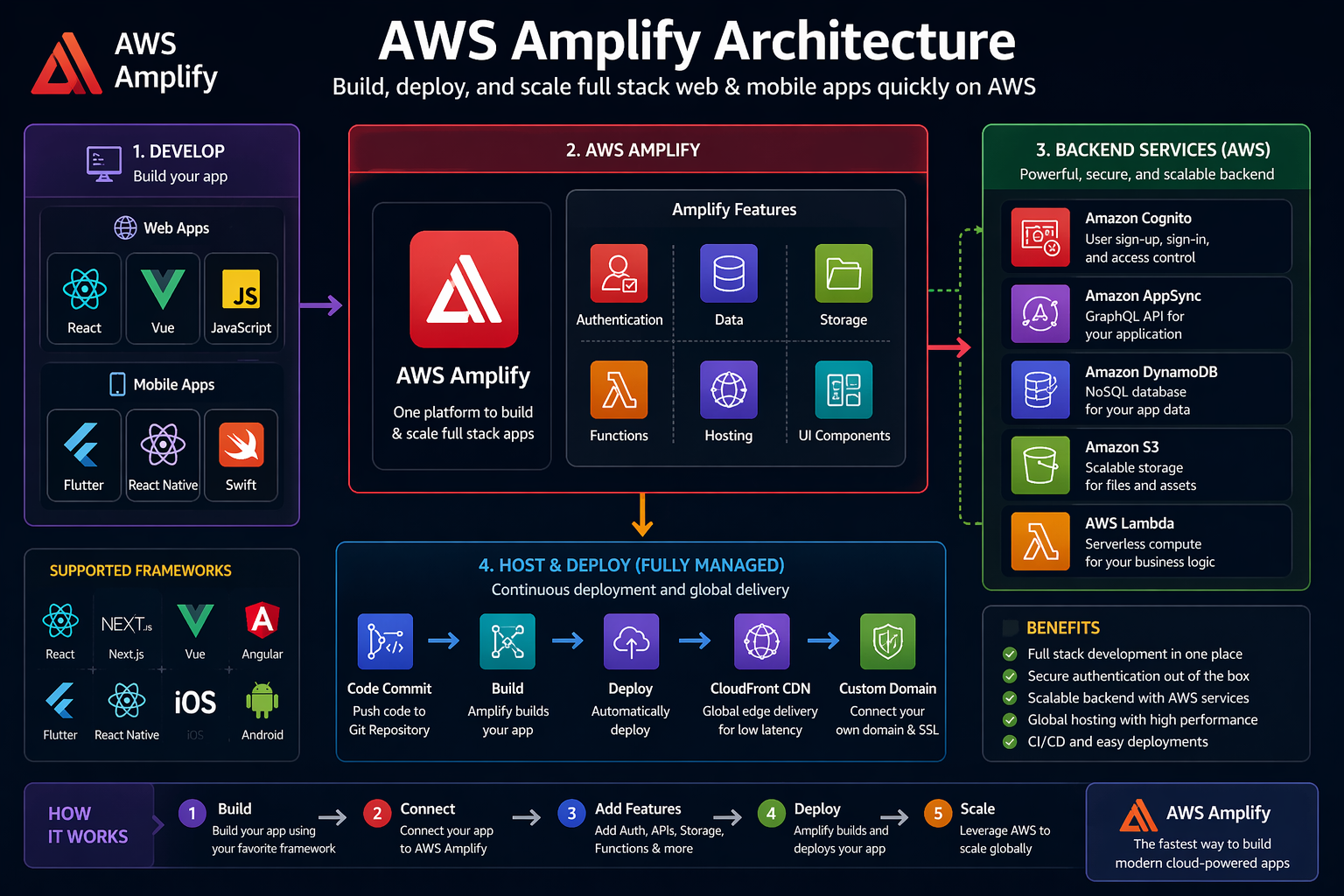
Visual overview of how Amplify connects frontend apps, backend services, hosting, and core AWS capabilities.
Amplify visual reference
Simple, clear, and user-friendly architecture view for readers landing on the page.
Amplify is about speed with structure
It helps teams move faster than building every AWS integration manually, while still connecting to real AWS services underneath.
Hosting is only one part
Many people first notice Amplify Hosting, but the bigger story is the fullstack developer workflow around auth, data, storage, and backend definition.
Frontend teams benefit most
Amplify is especially useful when teams want cloud features without hand-building every backend integration from scratch.
It still sits on real AWS building blocks
Amplify simplifies the experience, but the underlying architecture still touches core AWS services and design decisions.
AWS Amplify architecture diagram
The diagram below shows a common Amplify app flow where source code, Git-based deployment, frontend delivery, and backend app capabilities all connect into one developer-friendly workflow.
Developer to deployment flow
Build, connect, host, and extend modern web and mobile apps with a simpler fullstack path.
What is AWS Amplify?
AWS Amplify is a set of tools and workflows for building web and mobile applications on AWS with a smoother frontend-oriented experience. Instead of asking developers to start by wiring together multiple AWS services manually, Amplify provides a higher-level path for hosting apps, managing environments, connecting branches, adding auth and storage, defining data models, and shipping fullstack experiences more quickly. AWS currently positions Amplify around fullstack TypeScript, global web hosting, frontend and mobile app development, Git workflows, and connected backend capabilities.
In practical terms, Amplify is often used by React, Next.js, JavaScript, TypeScript, Flutter, and React Native teams that want to move quickly from frontend idea to full application experience. It can handle frontend hosting and also help developers add common app capabilities like user authentication, data access, storage, and functions without manually stitching every cloud service together from zero.
Amplify is especially attractive when teams care about:
- Fast app setup for frontend and mobile projects
- Managed hosting with Git-based deployments
- Branch previews and collaboration workflows
- Backend capabilities that feel closer to frontend development
- TypeScript-friendly definitions for app requirements
- Per-developer sandbox style iteration for fullstack work
AWS describes Amplify as everything needed to build web and mobile apps, with support for hosting, fullstack workflows, real-time and database-backed features, authentication, storage, functions, and extensibility into broader AWS services.
Simple definition
AWS Amplify is the AWS developer platform for hosting and building fullstack web and mobile apps with a frontend-friendly workflow.
What it is good at
- Fast web app hosting
- Git-connected deployment workflows
- Authentication, data, and storage integration
- Frontend-friendly fullstack development
- Branch-based collaboration and preview environments
What it does not replace
- Architecture thinking
- Security design
- Cost awareness
- Observability planning
- Choosing the right app platform for your use case
Why AWS Amplify matters
Amplify matters because many frontend and mobile teams want cloud-backed application features without spending their first sprint wiring raw infrastructure and backend integrations manually. It shortens the path between “I have a UI” and “I have a connected app with auth, data, storage, and delivery workflows.”
1. Frontend teams need more than static hosting
Most real apps need identity, data, uploads, environment workflows, and API access. Amplify gives those teams a more direct way to add those capabilities.
2. Delivery speed matters
Teams often want Git-connected deployments, branch previews, fast iteration, and fewer manual cloud setup steps for every new app idea.
3. AWS service breadth can feel heavy
AWS has deep capability, but not every frontend team wants to start by understanding dozens of separate services before shipping an app. Amplify reduces some of that friction.
When teams usually benefit from Amplify
- Launching a new web or mobile app quickly
- Building MVPs and early-stage products
- Adding auth, storage, and data to frontend-led apps
- Needing easy Git-based hosting workflows
- Wanting branch previews and easier collaboration
Where it fits especially well
- React and Next.js apps
- Frontend-led SaaS products
- Mobile app backends
- Internal dashboards and business apps
- Teams that prefer higher-level cloud workflows over manual stitching
AWS Amplify explained through the 5 W’s + How
What
AWS Amplify is the AWS platform for building and hosting fullstack web and mobile apps with a frontend-focused experience.
Why
To make it easier to add hosting, authentication, data, storage, and backend workflows without starting from raw AWS service wiring.
When
When teams want to move quickly from frontend code to a connected application with modern Git and deployment workflows.
Where
Across web and mobile app development, especially where Git-connected hosting and higher-level backend workflows are useful.
Who should care
- Frontend developers
- Fullstack JavaScript and TypeScript developers
- Mobile app developers
- Startup app builders
- Platform teams supporting app delivery
- Developers building internal business apps
Amplify is especially useful for teams that want to stay close to product and frontend iteration speed without having to hand-build every backend integration from day one.
How it works conceptually
A developer connects code from Git, uses Amplify for hosting and app workflows, defines backend needs such as auth, data, or storage, and Amplify provisions or connects the right AWS resources behind the scenes.
- Push app code from Git
- Deploy frontend through Amplify Hosting
- Add auth, data, storage, or functions as needed
- Use branch workflows and previews for collaboration
- Iterate with sandbox-style backend development where supported
Core AWS Amplify concepts
Amplify becomes easier to understand when broken into its main app-building pillars rather than viewed as one single feature.
Amplify Hosting
Amplify Hosting handles deployment of frontend apps with Git-based workflows and support for modern frameworks, including static and server-side rendered patterns.
Auth
Authentication and authorization are key Amplify building blocks for securing users, routes, data access, and app-level permissions.
Data
Amplify data workflows let apps connect to backend data models and APIs with a more frontend-friendly experience than creating everything manually.
Storage
Storage is part of the core app story, helping developers handle uploaded content, files, and app-managed assets more easily.
Functions
Functions and environment variables extend app logic beyond the UI and help teams add backend behavior when needed.
Extensibility
Amplify is not only a closed set of features. It can extend into additional AWS services and more customized patterns when needed.
| Component | Main role | Why it matters |
|---|---|---|
| Hosting | Frontend deployment and branch workflows | Lets teams host apps globally with managed CI/CD and framework-aware support. |
| Auth | User identity and access control | Critical for protected routes, app users, and controlled data access. |
| Data | Backend data and API connectivity | Helps developers build fullstack apps rather than just host static frontends. |
| Storage | Files and app content | Useful for uploads, media, documents, and app-managed content. |
| Functions | Custom backend logic | Adds backend behavior without hand-wiring a separate app platform from scratch. |
| Extensibility | Connection to broader AWS services | Allows teams to go beyond default Amplify capabilities when needed. |
How AWS Amplify works in practice
In a typical workflow, a developer starts with application code, connects it to Amplify, chooses the app capabilities needed, and uses Amplify’s managed workflows to host and evolve the application.
Typical Amplify flow
Why this feels different from raw AWS setup
The main difference is developer experience. Amplify tries to let developers think in app features and workflows rather than making them begin by manually composing every cloud service resource.
That means teams can focus first on:
- What the app needs
- How the frontend should ship
- How users should authenticate
- Where data lives and how it is accessed
- How branches and previews should behave
Then the platform can help provision and connect the right AWS resources with less boilerplate than a do-everything-yourself path.
Amplify Hosting, Git workflows, and CI/CD
Hosting is one of the most visible parts of Amplify. It supports Git-based workflows, managed CI/CD, pull request previews, and support for both static and server-side rendered web apps.
Git-connected deployments
A repo connection makes app delivery feel more natural for modern development teams. Code pushes, branch updates, and collaboration workflows can feed directly into hosting.
Preview environments
Preview-friendly workflows help designers, developers, and reviewers test app changes visually before they are merged into the main app flow.
Framework support
Amplify Hosting is designed for modern frontend frameworks and supports both SSR and static app patterns.
1. Developer pushes code to Git branch
2. Amplify detects the branch update
3. Build steps run automatically
4. Frontend app is deployed
5. Preview or hosted environment is updated
6. Team reviews behavior visually
7. Branch is merged when readyAmplify fullstack workflow and developer experience
Amplify’s newer direction emphasizes a fullstack TypeScript model, where developers can define data models, business logic, and auth rules in a more app-centric way and connect them into local and cloud workflows more smoothly.
Why this is useful
- Frontend and fullstack teams can move faster
- App features are defined closer to the developer workflow
- Backend capabilities feel less separated from app delivery
- Environment creation is easier for teams collaborating in branches
- Developers spend less early time wiring individual services manually
What this changes for teams
- Feature work becomes more app-centric
- Frontend and backend iteration cycles can be tighter
- Developers can think in terms of app requirements
- Teams gain a more unified path from idea to app experience
What still needs careful thinking
- How complex your backend requirements really are
- Whether higher-level workflows fit your long-term architecture
- How auth and data models should be designed
- What observability and cost visibility you need
- When to stay inside Amplify patterns and when to extend into broader AWS services
Amplify simplifies app-building, but app architecture decisions still matter. Teams should think about scale, complexity, compliance, and service boundaries before assuming every app should look the same.
AWS Amplify videos for on-page learning
These videos are embedded in large, comfortable sections instead of small thumbnails so visitors can stay on your page and still watch in a premium long-form layout.
Real-world AWS Amplify use cases
Amplify becomes much easier to evaluate when connected to the kinds of apps teams actually build.
Startup SaaS apps
Teams often use Amplify for fast-moving SaaS frontends where auth, data, storage, and hosted delivery all need to come together quickly.
Internal business portals
Internal dashboards, admin tools, and line-of-business apps benefit from quick hosting and built-in app features without requiring a fully hand-built platform from scratch.
Marketing sites with app features
Some teams start with a hosted frontend and then gradually add authentication, uploads, APIs, or personalized experiences as the product grows.
Next.js and React apps
Amplify hosting is attractive for frontend teams already working in React ecosystems and looking for an easier path to app deployment plus backend integration.
Mobile app backends
Mobile teams can use Amplify to support auth, data, storage, and other app needs without building each backend capability from a blank slate.
Team-based preview workflows
Branch previews and Git-driven hosting flows help teams review app changes visually and collaboratively as they iterate.
| Scenario | Main need | Why Amplify fits | Supporting AWS pieces |
|---|---|---|---|
| Frontend-led SaaS app | Fast app build and hosting | Combines hosting with auth, data, and storage workflows | Auth, data, storage, hosting |
| React / Next.js app | Framework-friendly hosting and delivery | Supports modern frontend workflows and Git-based deployment | Hosting, CDN delivery, build workflows |
| Internal dashboard | Secure app with fast setup | Useful for quickly connecting frontend apps to user access and app data | Auth, data, functions |
| Mobile backend support | Common app features without heavy setup | Helps mobile teams add fullstack capabilities more easily | Auth, data, storage, mobile libraries |
AWS Amplify comparison section
AWS Amplify vs hand-building with raw AWS services
| Area | AWS Amplify | Manual raw AWS setup |
|---|---|---|
| Developer experience | Higher-level and more frontend-friendly | More flexible but more manual |
| Setup speed | Usually faster for many app patterns | Often slower initially |
| Control depth | Good, with extensibility | Maximum control from the start |
| Best fit | Teams optimizing for app speed and frontend workflows | Teams needing total control or highly custom architecture from day one |
Amplify vs static hosting only
| Approach | Strength | Limitation |
|---|---|---|
| Static hosting only | Simple and lightweight | Does not solve auth, data, storage, or fullstack workflows by itself |
| Amplify | Broader app-building platform | May be more than you need for extremely simple sites |
Amplify vs custom app platform teams
| Approach | Best fit | Tradeoff |
|---|---|---|
| Amplify | Teams that want faster fullstack app delivery | Works best when app patterns fit the platform model |
| Custom platform | Teams with highly specific backend, governance, or platform needs | Higher setup effort and slower early delivery |
Best practices for AWS Amplify
Keep environments clean
Use clear branching and environment habits so app previews, staging, and production don’t become confusing.
Design auth carefully
Identity, authorization rules, and user data boundaries still need careful thought even when Amplify makes implementation easier.
Know when to extend
Amplify is powerful, but not every architecture should stay inside default high-level patterns forever.
Use Git workflows intentionally
Preview environments are great, but teams should still define clear review and release habits.
Monitor real app behavior
Hosting convenience does not remove the need to watch performance, auth behavior, and backend costs.
Think beyond the demo app
Design for scale, user growth, governance, and long-term maintainability, not just initial setup speed.
Common AWS Amplify mistakes
Architecture mistakes
- Assuming Amplify removes the need for architecture thinking
- Using it for app shapes that need much deeper custom platform control
- Ignoring how auth and data relationships should really work
- Treating preview environments as a replacement for good release practice
Workflow mistakes
- Not defining clear environment naming and branch strategy
- Letting app configuration drift across environments
- Skipping testing because deployment looks easy
- Not planning how the app will grow beyond MVP stage
Troubleshooting AWS Amplify
Build failures
Check framework config, environment variables, package manager behavior, and branch-specific build assumptions.
Auth issues
Validate sign-in flow, route protection, environment consistency, and identity assumptions between app layers.
Backend mismatch
Confirm that the expected data, storage, or function behavior matches the current environment and deployment branch.
1. Check which branch/environment you are using
2. Verify build and deploy logs
3. Confirm auth and environment variables
4. Review backend configuration changes
5. Test preview and production separately
6. Validate framework-specific deployment expectations