Amazon API Gateway Explained
Amazon API Gateway is the managed AWS service designed to create, publish, maintain, monitor, and secure APIs at scale. In real AWS environments, it acts as the front door for applications that need to expose business functionality through HTTP-based or WebSocket-based interfaces, whether the backend is AWS Lambda, an HTTP service, workloads on EC2, containerized services on ECS or EKS, or external systems reachable through integration layers.
This page focuses on how API Gateway is actually used in live environments: as a control point for routing, authentication, throttling, versioning, logging, observability, and release safety. It also explains where API Gateway fits relative to CloudFront, ALB, Lambda, Cognito, WAF, microservices, and serverless architecture patterns.
At a glance
A practical summary before the deeper architecture, security, and DevOps sections below.
Amazon API Gateway architecture (quick view)
This high-level diagram helps you quickly understand how Amazon API Gateway sits between clients and backend services, handling authentication, routing, throttling, and observability before requests reach your application.
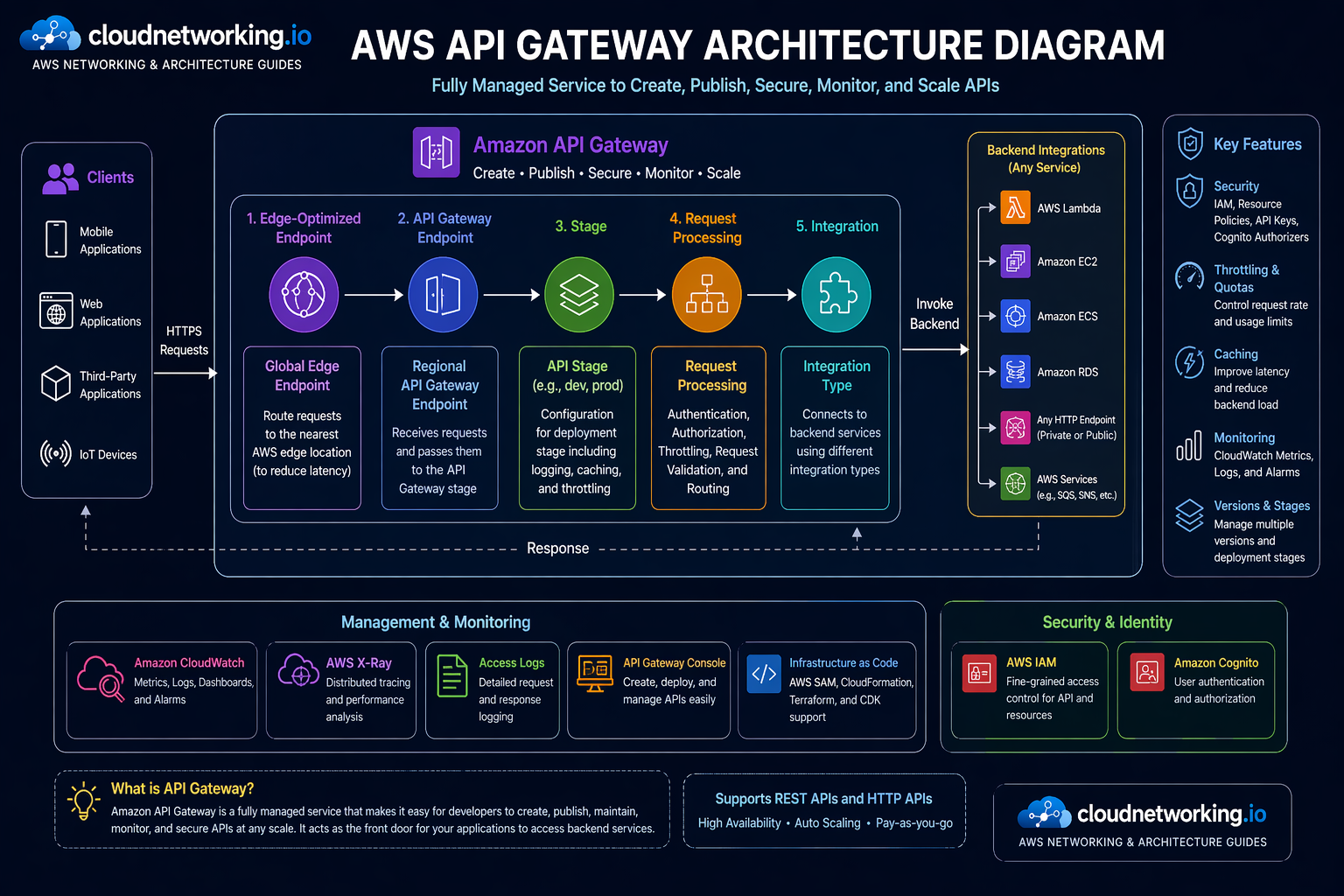
What you’re seeing
- Clients access APIs via HTTPS
- API Gateway applies authentication and throttling
- Requests are routed to backend integrations
- Logs and metrics flow to CloudWatch
Why this matters
- Gives instant clarity to new readers
- Improves engagement and time on page
- Helps users understand before reading text
- Matches AWS-style documentation pattern
API Gateway is an entry layer
Its biggest value is not just exposing endpoints. It centralizes request handling, security, routing, and policy for backend APIs.
Great for serverless and beyond
Often paired with Lambda, but it also works with HTTP backends, EC2 workloads, containers, and hybrid integration patterns.
Security belongs here early
JWT validation, Cognito, IAM, WAF, throttling, and access policy decisions are stronger when applied before requests hit backend code.
Operations matter
Logging, tracing, staged deployments, throttling, and troubleshooting discipline are what separate a demo API from a strong enterprise API surface.
What is Amazon API Gateway?
Amazon API Gateway is the AWS-managed service that gives you a controlled way to create and expose APIs to clients while keeping backend services behind a consistent, governed interface. It is designed to handle the API-facing tasks that teams otherwise have to build and operate themselves: accepting requests, routing traffic, enforcing security, managing versions, exposing stages, monitoring usage, and handling high levels of concurrent API calls.
API Gateway is the layer you put in front of your application logic when you do not want every client speaking directly to your Lambda functions, microservices, or backend endpoints without security, policy, or traffic controls. It helps normalize and govern the boundary between external consumers and internal business logic.
Teams use API Gateway to:
- Expose REST APIs for application backends
- Build lower-cost HTTP APIs for common HTTP integrations
- Run real-time bidirectional communication through WebSocket APIs
- Protect backend services with authentication and throttling
- Version APIs and stage deployments across dev, test, and prod
- Collect access logs, execution metrics, and latency signals
It is especially common in serverless architecture, but that should not make people think it is only for Lambda. API Gateway is just as important in broader integration design where clients need a managed API layer in front of containers, virtual machines, or HTTP backends.
Simple definition
Amazon API Gateway is the managed front door for APIs on AWS, providing routing, security, monitoring, and traffic handling in front of backend services.
What it is good at
- Centralized API exposure
- Authentication and authorization controls
- Traffic management and throttling
- Stage-based release control
- Integration with Lambda and HTTP services
- Cloud-native observability and governance
What it does not replace
- Good backend design
- Well-structured API contracts
- Application performance engineering
- Data-layer authorization
- Wider enterprise API strategy
Why Amazon API Gateway matters
APIs are often the product surface. Mobile apps, web apps, partner integrations, internal platforms, and microservices all depend on stable, secure APIs. API Gateway matters because it helps teams operate those APIs in a controlled way without reinventing the front-door layer for every backend.
1. Backend services need protection
Without an API control layer, every request can hit backend code directly. API Gateway gives you a place to apply auth, throttling, request management, and logging first.
2. Teams need consistency
In distributed systems, consistency matters. API Gateway helps standardize how APIs are exposed, versioned, secured, and observed across multiple services.
3. Operations move faster with control points
When incidents happen, it is easier to respond if you already have a managed control point for traffic shaping, staged deployments, and access policy.
When teams typically realize they need API Gateway
- When Lambda functions need a clean public interface
- When multiple services need one consistent API entry pattern
- When direct backend exposure becomes a security concern
- When traffic controls and rate limits become necessary
- When versioning and release stages are needed for APIs
Where API Gateway is especially useful
- Serverless backends
- Mobile and SPA backends
- Internal platform APIs
- Partner-facing APIs
- Microservices exposure layers
- Webhook and callback interfaces
Amazon API Gateway explained through the 5 W’s + How
What
A managed AWS service for creating, publishing, maintaining, monitoring, and securing APIs.
Why
To centralize API traffic control, security, routing, and observability in front of backend services.
When
When applications need secure, scalable API exposure for web, mobile, partner, internal, or event-driven use cases.
Where
At the client-facing boundary between API consumers and backend services such as Lambda, HTTP services, EC2, or containers.
Who should care
- Backend engineers
- Serverless engineers
- Platform engineers
- DevOps teams
- Cloud architects
- Security engineers
- API product teams
API Gateway is relevant to any team responsible for exposing application capabilities safely and at scale.
How it works conceptually
Clients send requests to API Gateway. API Gateway authenticates, authorizes, rate-limits, and routes those requests to the configured backend integration. It then returns the backend response while recording metrics, logs, and other execution signals along the way.
- Client sends request
- API Gateway validates auth and policy
- Traffic controls are applied
- Request is routed to backend integration
- Response is returned to client
- Logs, metrics, and traces support operations
REST APIs vs HTTP APIs vs WebSocket APIs
One of the first architecture decisions with API Gateway is choosing the right API type. The right choice depends on features, cost, complexity, and client interaction model.
REST APIs
REST APIs are the richer API Gateway model. They are often chosen when teams need more mature features, complex request transformations, or broader gateway capabilities.
HTTP APIs
HTTP APIs are typically simpler and lower-cost for common HTTP-based use cases, especially when teams want a lighter API layer without the extra complexity of full REST API features.
WebSocket APIs
WebSocket APIs are built for stateful, full-duplex communication where clients need real-time interaction instead of plain request-response behavior.
| API type | Best fit | Strength | Watch-out |
|---|---|---|---|
| REST API | Richer API management needs | Feature depth and mature control options | Can be heavier and costlier than simpler options |
| HTTP API | Modern HTTP workloads | Lower complexity and lower cost for many cases | May not cover every advanced use case teams want from REST APIs |
| WebSocket API | Real-time messaging or interactive apps | Stateful client-server communication | Needs a very different design mindset from plain request-response APIs |
Core Amazon API Gateway concepts
Understanding API Gateway becomes much easier when teams separate the service into core concepts: routes, integrations, stages, authorizers, domains, usage control, and observability.
Routes and resources
Routes define how incoming requests map to backend logic. In enterprise design, route structure affects API clarity, versioning, team ownership, and observability.
Integrations
The integration is where API Gateway sends the request next: Lambda, HTTP backends, internal services, or other targets depending on the architecture.
Stages and deployments
Stages let teams expose separate environments such as dev, sit, uat, and prod, which is essential for safer promotion and rollback workflows.
Authorizers
Authorizers are how teams enforce request-level access control using IAM, Cognito, JWT tokens, or Lambda-based custom logic.
Usage control
Throttling, quotas, and other limits matter because APIs are easy to abuse unintentionally or maliciously if they are exposed without traffic governance.
Observability
CloudWatch metrics, logs, and X-Ray tracing are what make API Gateway operationally safe after launch. Without them, teams are mostly guessing during incidents.
| Concept | Primary role | Why it matters |
|---|---|---|
| Route / resource | Traffic mapping | Defines how client requests map to backend behavior. |
| Integration | Backend connection | Determines where the API sends the request next. |
| Stage | Environment exposure | Supports lifecycle separation across dev, test, and prod. |
| Authorizer | Access control | Protects APIs before traffic reaches backend code. |
| Custom domain | API experience and branding | Helps expose stable, business-friendly API endpoints. |
| Throttling and quotas | Traffic governance | Helps prevent overload and abuse. |
| Logs and traces | Operations and debugging | Essential for troubleshooting and incident diagnosis. |
How Amazon API Gateway works in practice
API Gateway is easiest to understand as a managed request pipeline. Each request reaches the gateway, passes through policy and traffic controls, then routes to a backend integration.
Step-by-step request flow
Why this matters operationally
The gateway is a powerful control point because it lets teams manage how requests enter the application boundary before the backend starts spending compute, memory, database calls, or external dependency capacity.
- It reduces direct backend exposure.
- It centralizes security logic.
- It enables safer release patterns through stages and deployments.
- It gives operations teams one place to observe API behavior.
- It helps normalize different backend types under one API surface.
Security deep dive for Amazon API Gateway
Security is one of the biggest reasons teams choose API Gateway instead of exposing raw backends. The gateway gives a strong place to enforce identity, access, usage control, and edge protection before requests hit the backend.
IAM-based access
IAM authorization is useful when clients are AWS-aware and request signing fits the access model, especially for internal or controlled service-to-service use cases.
Amazon Cognito
Cognito is commonly used when user-facing apps need token-based identity controls tied to user pools and modern auth flows.
Lambda authorizers
Lambda authorizers are helpful when access logic needs to be custom, dynamic, or integrated with external identity rules beyond simpler native options.
JWT validation
JWT-based security is important for modern API access patterns because it allows token-driven authorization decisions close to the API edge.
AWS WAF integration
WAF adds request-layer protection against common web exploits, malicious patterns, and abusive traffic before it reaches backend logic.
Throttling and usage controls
Security is not just identity. APIs also need traffic governance to reduce abuse, noisy clients, accidental storms, and cost amplification.
Security controls teams often combine
- JWT or Cognito for user auth
- IAM for internal or AWS-native access
- WAF for request filtering
- Throttling for abuse reduction
- Custom domains and TLS for trusted exposure
- CloudWatch and X-Ray for incident diagnosis
Common security misunderstandings
- “API Gateway alone makes the backend secure”
- “If auth passes, no more validation is needed”
- “Throttling is only a cost control, not a resilience and security control”
- “All APIs need the same authorizer model”
- “WAF replaces auth and backend authorization”
Client -> API Gateway -> JWT validation
       -> if valid -> backend integration
       -> if invalid -> reject request

Security layers often include:
- token issuer validation
- audience validation
- expiry checks
- route-level authorization
- backend business authorizationDevOps and CI/CD for Amazon API Gateway
API Gateway becomes far more powerful when managed through a delivery workflow instead of through manual console edits. In real environments, APIs change frequently. Routes evolve, authorizers change, backends move, and versions need controlled promotion. That is why DevOps discipline matters here.
What strong teams automate
- API definitions and stage creation
- Authorizer and integration configuration
- Custom domain and certificate binding
- Logging and metrics defaults
- Canary or staged release patterns
- Promotion across dev, sit, uat, and prod
Why DevOps matters here
API Gateway is a high-risk place for manual drift because one console change can affect many clients immediately. Putting it into Infrastructure as Code and CI/CD creates reviewability, rollback discipline, and environment consistency.
Typical pipeline flow
- API contract or IaC changes are committed.
- Static validation and formatting checks run.
- Stage-specific deployment artifacts are generated.
- Changes are deployed into lower environments first.
- Tests validate auth, routes, and integration behavior.
- Promotion to higher environments happens through gated workflow.
DevOps risk to avoid
Do not treat API Gateway as a last-mile config that can be edited manually after the pipeline runs. That creates drift and makes incidents much harder to troubleshoot.
name: Deploy API Gateway

on:
  push:
    branches: [ main ]

jobs:
  deploy-api:
    runs-on: ubuntu-latest
    steps:
      - uses: actions/checkout@v4

      - name: Validate API spec
        run: echo "Validate OpenAPI or IaC here"

      - name: Deploy to AWS
        run: echo "Run Terraform, CloudFormation, SAM, or CDK deployment here"

      - name: Run smoke tests
run: echo "Test auth, routes, and health endpoints here"Performance, throttling, caching, and cost thinking
Good API design is not only about functionality. In real environments, latency, request volume, retry storms, caching behavior, and client abuse patterns can define whether an API feels stable and cost-efficient.
Throttling
Throttling protects both performance and cost. Without it, badly behaved clients or bursts of traffic can create backend overload and unstable user experience.
Caching
Caching can reduce backend load and improve latency when responses are stable enough to benefit from reuse. It must be used thoughtfully to avoid stale or misleading responses.
Observability
Latency, error rates, request volume, and backend integration timing should be visible before traffic scales, not after the first incident.
| Concern | What to watch | Common response |
|---|---|---|
| Latency | API duration, integration timing, backend health | Optimize backend, review route behavior, add caching where valid |
| 429 responses | Client rate behavior and throttle settings | Tune limits and identify abusive or noisy clients |
| Backend overload | Error spikes, timeout patterns, retry storms | Protect with throttling, circuit patterns, and backend resilience work |
| Unexpected cost growth | Request volume, integration type, traffic spikes | Review API type choice, caching, and client behavior |
Amazon API Gateway videos for on-page learning
These large embedded videos are spaced out intentionally so the page feels guided instead of crowded. I also removed the duplicate live link and kept unique videos only.
Real-world Amazon API Gateway use cases
API Gateway becomes easiest to understand when mapped to the systems teams actually build and operate.
Mobile and SPA backend APIs
API Gateway works well when mobile apps and browser applications need a clean HTTPS interface in front of backend business logic.
Lambda-backed serverless APIs
One of the most common patterns is using API Gateway to expose Lambda functions as managed API endpoints with auth, throttling, and logging.
Partner-facing APIs
Partner integrations often benefit from custom domains, stable routing, usage controls, and central auth enforcement close to the API edge.
Microservices API entry layer
API Gateway can sit in front of multiple service backends and give clients one consistent access pattern instead of exposing each service directly.
Real-time apps with WebSocket APIs
When applications need stateful bidirectional communication, WebSocket APIs provide a better fit than pure request-response endpoints.
Internal platform APIs
Internal developer platforms and enterprise service layers often use API Gateway to standardize service exposure and policy handling.
| Scenario | Main need | Why API Gateway fits | Common backend |
|---|---|---|---|
| Serverless app backend | Expose Lambda securely | Managed API entry layer with auth and throttling | Lambda |
| Partner integration API | Stable external access | Custom domains, usage control, and logging | HTTP backend or service mesh |
| Microservices front door | Unify service exposure | Route and secure requests centrally | ECS, EKS, EC2, or HTTP services |
| Real-time interaction | Bidirectional communication | WebSocket API support | Lambda or HTTP backend |
Amazon API Gateway comparison section
API Gateway vs Application Load Balancer
| Area | API Gateway | ALB |
|---|---|---|
| Main focus | Managed API exposure and control | HTTP and application traffic load balancing |
| Best when | You need API auth, throttling, stages, and API-centric controls | You need load balancing for app traffic across targets |
| Security model | Authorizers, usage control, API-centric policy | App traffic routing and listener rules |
API Gateway vs direct Lambda URL or direct backend exposure
| Approach | Strength | Tradeoff |
|---|---|---|
| API Gateway | Managed control, observability, stages, authorizers, throttling | More moving parts than exposing a backend directly |
| Direct backend exposure | Simpler initial path | Weaker central governance and less control at the edge |
REST APIs vs HTTP APIs
| Aspect | REST APIs | HTTP APIs |
|---|---|---|
| Feature depth | Richer | Lighter |
| Cost profile | Usually higher for similar traffic patterns | Usually lower for many common HTTP use cases |
| Best fit | Advanced API controls | Modern simpler HTTP workloads |
Amazon API Gateway best practices
Design routes intentionally
Clear route structure improves ownership, versioning, observability, and long-term maintainability.
Push security early
Use authorizers, WAF, throttling, and TLS thoughtfully so bad traffic is filtered before it reaches expensive backend logic.
Use Infrastructure as Code
APIs should be repeatable, reviewable, and deployable through pipelines rather than being maintained through manual console drift.
Separate environments cleanly
Use stages and promotion discipline so API changes do not jump straight into customer-facing environments without validation.
Instrument early
Access logs, execution metrics, alarms, and traces should be present before the first serious traffic spike or incident.
Choose the right API type
Do not automatically default to REST APIs if HTTP APIs are enough, and do not force HTTP APIs into use cases that truly need richer controls.
Common Amazon API Gateway mistakes
Skipping auth design
Teams sometimes expose routes first and plan access control later. That usually creates avoidable rework and security gaps.
Using the wrong API type
Choosing REST or HTTP APIs without understanding the feature tradeoff can create cost or capability problems later.
No throttling strategy
Uncontrolled clients can destabilize the backend quickly if there is no request governance at the API layer.
Console-only changes
Manual edits create drift and make it much harder to understand what changed when an incident appears.
Weak observability
If access logs, metrics, and traces are missing, the team loses one of the biggest operational advantages of using API Gateway.
Confusing gateway auth with business auth
Gateway-level access checks do not replace application-level permission checks inside the backend.
Amazon API Gateway troubleshooting guide
Strong troubleshooting starts by isolating whether the problem is identity, gateway policy, route configuration, integration configuration, or backend behavior.
| Issue | Likely cause | What to check | Fix direction |
|---|---|---|---|
| 401 or 403 responses | Auth or policy problem | Authorizer config, JWT claims, IAM policy, Cognito setup | Validate identity flow and route access rules |
| 429 errors | Throttle or quota pressure | Usage pattern, stage settings, client burst behavior | Tune limits and identify high-volume callers |
| High latency | Backend or integration delay | CloudWatch metrics, X-Ray, backend health, integration timing | Isolate where delay enters the request path |
| 5xx errors | Backend failure or integration mismatch | Lambda logs, HTTP backend health, mapping issues | Verify backend behavior and integration contract |
| Unexpected client behavior across stages | Wrong stage, domain mapping, or route mismatch | Stage config, deployment history, domain mapping | Review environment separation and routing setup |
- Is the client calling the right stage and route?
- Is the authorizer attached to the correct route?
- Are JWT claims, issuer, and audience valid?
- Is throttling rejecting traffic?
- Is the backend reachable and healthy?
- Are CloudWatch logs showing request flow clearly?
- Does X-Ray show downstream dependency issues?